AI Video Generators: The Future of Video Creation
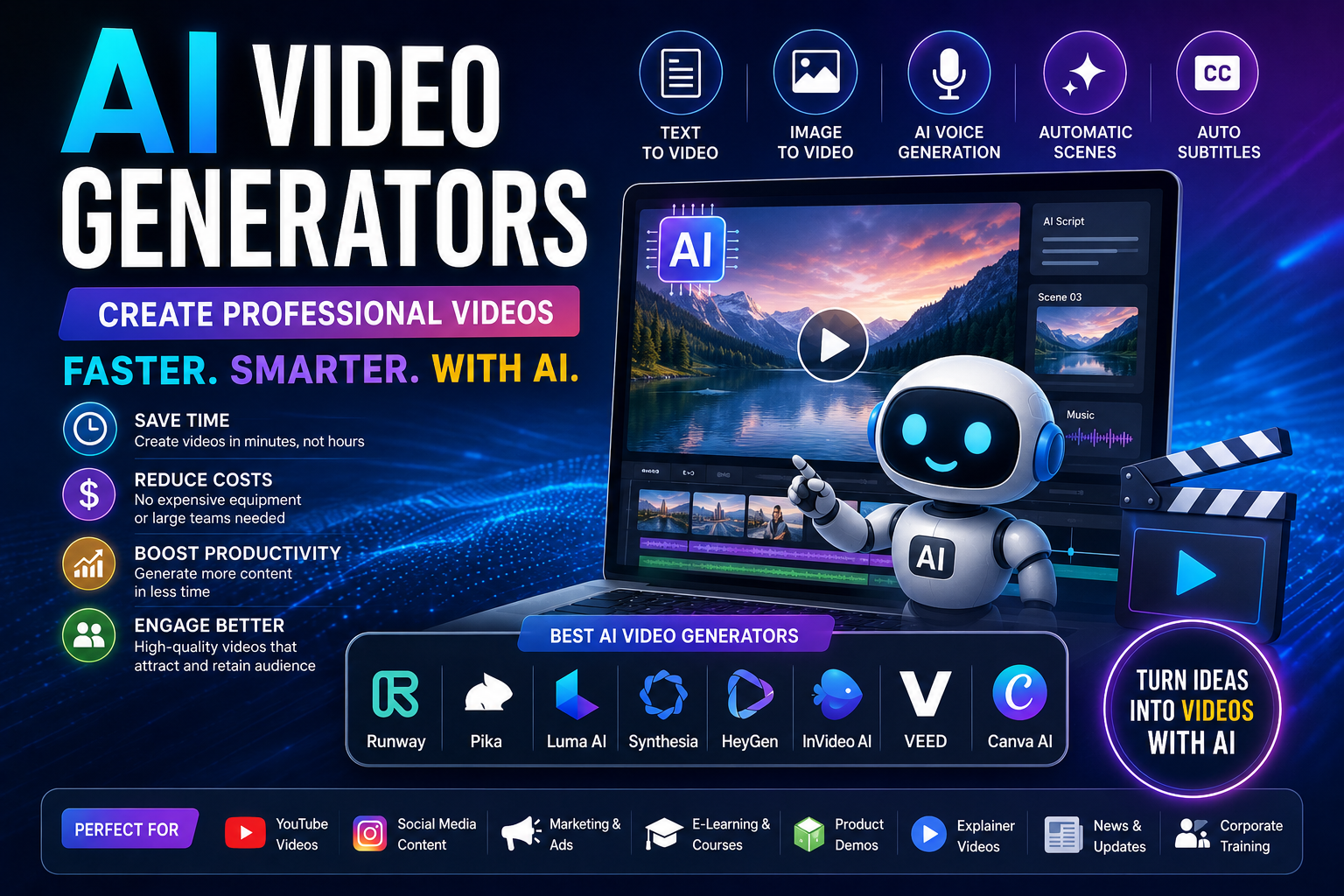
Artificial Intelligence (AI) is transforming the way videos are created. Instead of spending hours recording, editing, and rendering footage, modern AI video generators can produce professional-quality videos from a simple text prompt, script, or image in just a few minutes.
Whether you’re a YouTuber, blogger, digital marketer, educator, business owner, or content creator, AI video generators help you create engaging content faster while reducing production costs.
In this guide, you’ll learn what AI video generators are, how they work, their benefits, real-world applications, and the best AI video generation tools available in 2026.
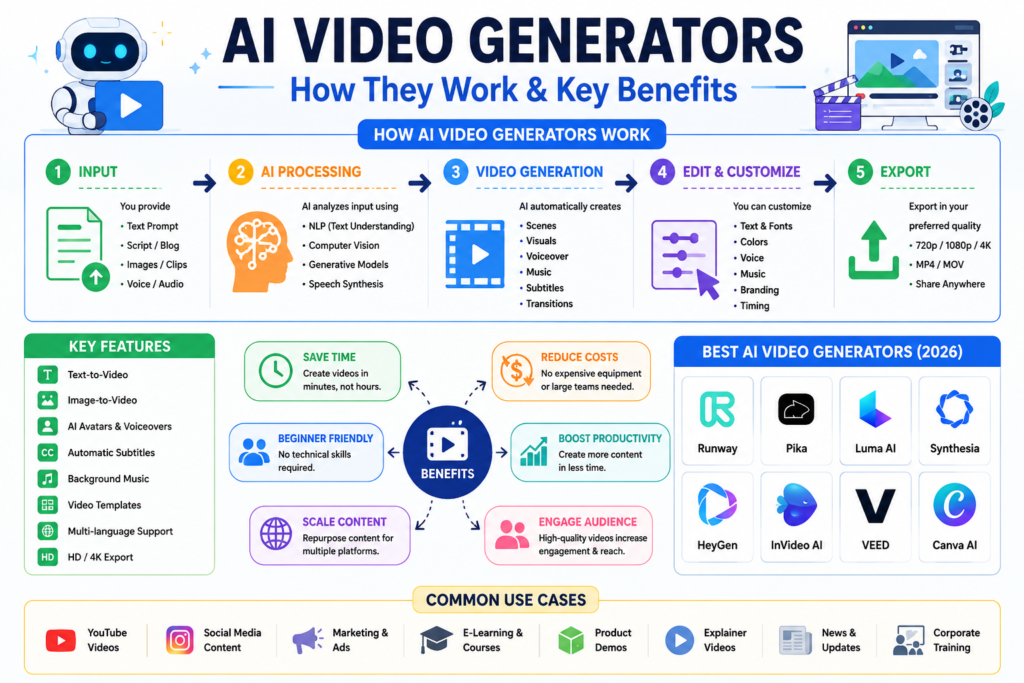
Table of Contents
What Are AI Video Generators?
AI video generators are software applications that use machine learning and generative AI to automatically create videos from text prompts, images, voice, presentations, or existing footage.
Depending on the platform, AI can:
- Convert text into video
- Create animations
- Generate realistic avatars
- Produce AI voiceovers
- Add subtitles automatically
- Generate background music
- Edit videos automatically
- Create social media videos
- Generate cinematic scenes
How AI Video Generators Work
Most AI video platforms follow these steps:
Step 1 – User Input
Provide one or more of the following:
- Text prompt
- Script
- Blog article
- PowerPoint
- Images
- Voice recording
Step 2 – AI Processing
The AI analyzes your input using:
- Natural Language Processing (NLP)
- Computer Vision
- Large Language Models (LLMs)
- Speech Synthesis
- Video Diffusion Models
Step 3 – Video Generation
The platform automatically creates:
- Scenes
- AI narration
- Visuals
- Background music
- Animations
- Transitions
- Subtitles
Step 4 – Editing
You can refine the output by changing:
- Colors
- Fonts
- Timing
- Voice
- Music
- Branding
- Captions
Key Features of AI Video Generators
- Text-to-video
- Image-to-video
- AI avatars
- AI voice generation
- Automatic subtitles
- Background music
- Multi-language support
- Stock media integration
- Brand kits
- Video templates
- Scene generation
- Script generation
- Auto-editing
- HD and 4K export (tool dependent)
Benefits of AI Video Generators
Save Time
Generate videos in minutes instead of hours.
Reduce Costs
No need for expensive cameras, studios, or large editing teams.
Beginner Friendly
Most tools require little or no video editing experience.
Increase Productivity
Create multiple videos for blogs, YouTube, Instagram, LinkedIn, Facebook, and TikTok from the same script.
Scale Content Marketing
Repurpose articles into videos to reach a wider audience.
Best AI Video Generators in 2026
1. Runway
Official Website: Runway
Best For
- Text-to-video
- Image-to-video
- AI editing
- Creative filmmaking
Pros
- High-quality generation
- Powerful editing tools
- Professional features
Cons
- Advanced features require a paid plan
2. Pika
Official Website: Pika
Best For
- Short AI videos
- Social media content
- Creative animations
3. Luma AI Dream Machine
Official Website: Luma AI
Best For
- Cinematic AI videos
- Realistic motion
- Product showcases
4. Synthesia
Official Website: Synthesia
Best For
- AI presenters
- Business training
- Corporate videos
- Educational content
5. HeyGen
Official Website: HeyGen
Best For
- Talking avatars
- Marketing videos
- Explainer videos
6. InVideo AI
Official Website: InVideo AI
Best For
- Blog-to-video
- YouTube automation
- Social media
7. VEED
Official Website: VEED
Best For
- AI editing
- Captions
- Podcast videos
8. Canva AI Video
Official Website: Canva
Best For
- Presentations
- Reels
- Educational videos
Comparison Table
| Tool | Free Plan | Best For |
|---|---|---|
| Runway | Yes | Professional AI videos |
| Pika | Yes | Short-form content |
| Luma AI | Yes | Cinematic scenes |
| Synthesia | Trial | AI avatars |
| HeyGen | Trial | Talking presenters |
| InVideo AI | Yes | Blog-to-video |
| VEED | Yes | Editing & subtitles |
| Canva AI | Yes | Social media |
How to Use an AI Video Generator
Step 1
Choose a tool based on your goal.
Step 2
Create an account.
Step 3
Select Text to Video or another suitable workflow.
Step 4
Enter a detailed prompt.
Example:
“Create a 30-second promotional video about solar energy with cinematic drone shots, modern graphics, upbeat music, and subtitles.”
Step 5
Choose:
- Style
- Aspect ratio
- Voice
- Language
- Duration
Step 6
Generate the video.
Step 7
Review and edit the scenes.
Step 8
Export in HD or 4K if supported.
Example: Blog to Video
Suppose you have a blog titled:
10 Benefits of Solar Energy
Workflow:
- Copy the article text.
- Paste it into an AI video generator.
- Choose a professional template.
- Let AI generate scenes and narration.
- Add your logo and brand colors.
- Export and upload to YouTube, Facebook, or Instagram.
AI Video Prompt Examples
Product Advertisement
Create a 20-second luxury smartwatch advertisement with cinematic lighting, close-up product shots, modern typography, and energetic background music.
Travel Video
Generate a one-minute travel video featuring mountains, waterfalls, forests, drone footage, and inspirational narration.
Educational Video
Explain Artificial Intelligence using simple animations, icons, charts, subtitles, and a friendly voiceover.
YouTube Intro
Design a futuristic technology intro with glowing blue effects, animated logo reveal, and electronic background music.
Best Practices
- Write specific prompts.
- Use short scenes instead of one long prompt.
- Review for factual accuracy.
- Add your own branding.
- Keep videos concise for social platforms.
- Optimize titles, thumbnails, and captions for SEO.
Common Mistakes to Avoid
- Using vague prompts.
- Ignoring copyright and licensing terms.
- Publishing without reviewing AI output.
- Overusing effects that distract from the message.
- Forgetting captions for accessibility.
Frequently Asked Questions
Are AI video generators free?
Many platforms provide free plans with limits on video length, export quality, or watermarks. Premium subscriptions unlock additional features.
Which AI video generator is best?
The best tool depends on your needs. Runway excels at creative video generation, Synthesia and HeyGen focus on AI presenters, while InVideo AI is ideal for converting articles into videos.
Can AI create YouTube videos?
Yes. AI can assist with scripts, narration, visuals, subtitles, and editing. Human review is still important to ensure quality and accuracy.
Can I use AI-generated videos commercially?
Many platforms permit commercial use under certain subscription plans or licensing terms. Always review each provider’s terms before publishing.
Final Thoughts
AI video generators are changing digital content creation by making professional video production faster and more accessible. They are excellent for marketing, education, product demonstrations, tutorials, and social media.
Rather than replacing creativity, AI helps creators spend less time on repetitive editing and more time developing ideas and refining their message.
As these tools continue to improve, learning how to use them effectively will become an increasingly valuable skill for bloggers, businesses, educators, and content creators.
SEO Checklist
Focus Keyword
AI Video Generators
SEO Title
Best AI Video Generators in 2026 – Complete Guide with Examples
Meta Description
Learn everything about AI video generators, compare the best tools, discover real-world examples, and follow step-by-step tutorials to create AI-powered videos.
Suggested Categories
- Artificial Intelligence
- AI Tools
- Video Editing
- Content Creation
- Technology
Suggested Tags
AI Video Generators, Best AI Video Generator, Free AI Video Generator, Text to Video AI, AI Video Creator, AI Video Editor, AI Avatars, Runway, Pika, Luma AI, Synthesia, HeyGen, InVideo AI, Canva AI, VEED, Generative AI, Content Creation, YouTube Tools, Video Marketing, Artificial Intelligence
Recommended Internal Links
- AI Tools
- AI Agents vs AI Chatbots
- What Is Generative AI?
- Prompt Engineering Guide
- Best AI Image Generators
- Best AI Coding Assistants
This article is a strong foundation for SEO. To compete for top Google results, consider expanding it to 4,000–6,000 words with original screenshots of each tool, feature comparison tables, FAQ schema, HowTo schema, pros/cons tables, pricing details, performance benchmarks, and links to individual in-depth reviews of each AI video generator.
Video Tutorials & Official Learning Resources
1. Runway AI
- 🌐 Website: Runway AI Video Generator
- 🎓 Official Video Tutorials: Runway AI Academy Tutorials
- 📚 Beginner Learning Hub: Runway AI Academy
2. InVideo AI
- 🌐 Website: InVideo AI
- 📖 Step-by-Step Guide: How to Make AI Videos Using InVideo AI
- 🎥 Official Tutorial (v4.0): InVideo AI Tutorial Guide
3. Pika
- 🌐 Website: Pika
4. Luma AI Dream Machine
- 🌐 Website: Luma AI
5. Synthesia
- 🌐 Website: Synthesia
6. HeyGen
- 🌐 Website: HeyGen
7. VEED
- 🌐 Website: VEED
8. Canva AI
- 🌐 Website: Canva AI
Suggested YouTube Search Keywords
Since tutorial videos are updated frequently, these search terms help readers find the latest official content:
- Runway AI Tutorial 2026
- InVideo AI Tutorial
- Pika AI Beginner Guide
- Luma AI Dream Machine Tutorial
- Synthesia AI Tutorial
- HeyGen AI Tutorial
- VEED AI Tutorial
- Canva AI Video Generator Tutorial

vkgandhig
Technology, AI and Cyber Security Updates.

Leave a Reply