

The internet has become an essential part of everyday life, but it also exposes users to cyber threats, data tracking, and privacy risks. Whether you’re working remotely, using public Wi-Fi, or accessing business resources, protecting your online activities is more important than ever.
A Virtual Private Network (VPN) creates a secure, encrypted connection between your device and the internet, helping protect your personal information from hackers, internet service providers (ISPs), and malicious attackers.
In this guide, you’ll learn everything about VPNs, including how they work, their advantages, limitations, types, real-world applications, and best security practices.

Table of Contents
What Is a VPN?
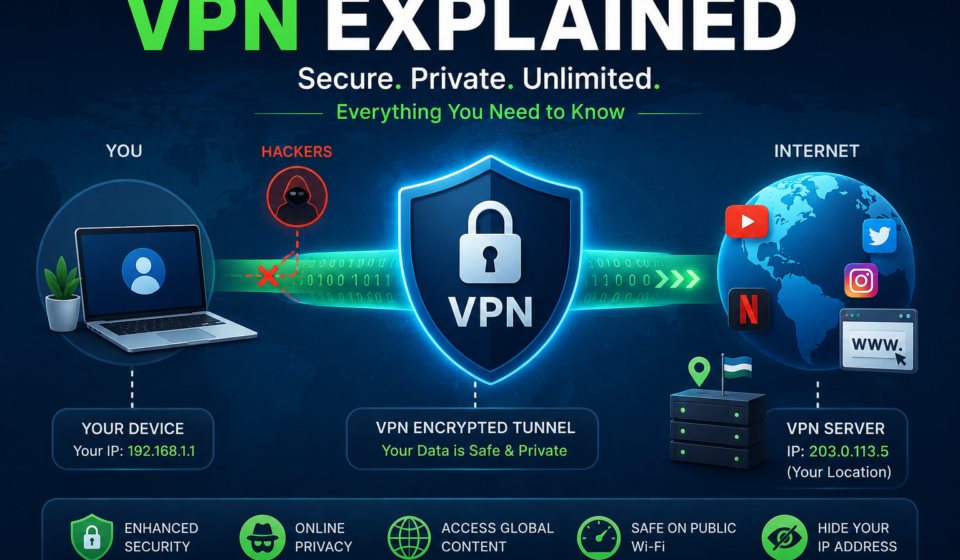
A Virtual Private Network (VPN) is a cybersecurity technology that creates an encrypted tunnel between your device and a VPN server. Instead of connecting directly to a website, your internet traffic first passes through the VPN server, making your connection private and secure.
A VPN helps protect:
- Personal information
- Browsing activity
- Passwords
- Banking transactions
- Business communications
- Sensitive company data
Why Do You Need a VPN?
Without a VPN:
- Your ISP can monitor browsing activity.
- Public Wi-Fi attackers may intercept your data.
- Websites can track your IP address.
- Cybercriminals can attempt man-in-the-middle attacks.
With a VPN:
- Data is encrypted.
- Your IP address is hidden.
- Internet traffic becomes private.
- Remote work becomes more secure.
How Does a VPN Work?
The VPN process follows these steps:
- You connect to a VPN application.
- The VPN authenticates your connection.
- A secure encrypted tunnel is established.
- Internet traffic travels through the tunnel.
- The VPN server forwards requests to websites.
- Websites respond to the VPN server.
- The encrypted response is sent back to your device.
This process prevents outsiders from reading your internet traffic.
VPN Architecture Diagram
+-------------------+
|   User Device     |
| Laptop / Mobile   |
+---------+---------+
          |
          | Encrypted Tunnel
          |
          V
+-------------------+
|    VPN Server     |
| Authentication    |
| Encryption        |
+---------+---------+
          |
          |
          V
+-------------------+
|    Internet       |
| Websites/Cloud    |
+-------------------+
Key Components of a VPN
1. VPN Client
Software installed on the user’s device that creates the secure connection.
2. VPN Server
Receives encrypted traffic and forwards it to the internet.
3. Encryption
Protects transmitted data from unauthorized access.
4. Authentication
Verifies that only authorized users can access the VPN.
5. VPN Tunnel
A secure encrypted communication path between the device and server.
Types of VPNs
Remote Access VPN
Designed for individual users working remotely.
Common Uses
- Work from home
- Secure public Wi-Fi
- Personal privacy
Site-to-Site VPN
Connects multiple office locations securely.
Example:
Office A
      |
Encrypted Tunnel
      |
Office B
Client-to-Site VPN
Allows employees to securely access company resources remotely.
Cloud VPN
Provides secure access to cloud infrastructure.
Commonly used with:
- AWS
- Microsoft Azure
- Google Cloud
Popular VPN Protocols
| Protocol | Speed | Security | Recommended |
|---|---|---|---|
| WireGuard | Very High | Excellent | ⭐⭐⭐⭐⭐ |
| OpenVPN | High | Excellent | ⭐⭐⭐⭐⭐ |
| IKEv2/IPsec | High | Excellent | ⭐⭐⭐⭐ |
| SSTP | Medium | Good | ⭐⭐⭐ |
| L2TP/IPsec | Medium | Good | ⭐⭐⭐ |
| PPTP | Fast | Weak | ❌ Not Recommended |
VPN Encryption
Modern VPNs use advanced encryption standards including:
- AES-256
- ChaCha20
- RSA Authentication
- SHA-2 Integrity Checking
Strong encryption ensures intercepted data remains unreadable without the encryption keys.
Benefits of Using a VPN
Improved Privacy
Masks your IP address and reduces tracking.
Secure Public Wi-Fi
Protects your connection in airports, hotels, cafes, and other public networks.
Remote Work Security
Enables employees to securely access company systems from anywhere.
Data Encryption
Prevents attackers from reading transmitted information.
Safe Online Banking
Adds an extra layer of protection for sensitive financial activities, especially on untrusted networks.
Business Security
Protects confidential communications between employees and offices.
Limitations of VPNs
Although VPNs improve privacy, they are not a complete cybersecurity solution.
Limitations include:
- May reduce internet speed due to encryption.
- Cannot prevent phishing attacks.
- Does not remove malware already on your device.
- Requires trust in the VPN provider.
- Some websites may detect and restrict VPN traffic.
VPN vs Proxy
| Feature | VPN | Proxy |
|---|---|---|
| Encrypts Data | ✅ | ❌ |
| Hides IP Address | ✅ | ✅ |
| Protects All Apps | ✅ | Usually No |
| Security | High | Low |
| Privacy | High | Moderate |
VPN vs Firewall
| Firewall | VPN |
|---|---|
| Blocks unauthorized access | Encrypts internet traffic |
| Protects network | Protects communication |
| Filters traffic | Secures traffic |
| Stops attacks | Prevents eavesdropping |
Both technologies complement each other and are commonly used together.
Common VPN Use Cases
Personal Users
- Private browsing
- Secure public Wi-Fi
- Protecting personal information
Businesses
- Remote employee access
- Secure branch office connectivity
- Protecting internal systems
Educational Institutions
- Secure access to campus resources
- Protecting student and staff communications
Healthcare
- Securing sensitive patient data
- Enabling remote access for healthcare professionals
VPN Security Best Practices
- Choose a reputable VPN provider with transparent privacy policies.
- Use modern protocols such as WireGuard or OpenVPN.
- Enable Multi-Factor Authentication (MFA) on VPN accounts.
- Keep your VPN software updated.
- Avoid outdated protocols like PPTP.
- Use strong, unique passwords.
- Combine VPN usage with antivirus software and a firewall.
- Disconnect from public Wi-Fi when not needed.
Common VPN Myths
Myth 1: VPNs Make You Completely Anonymous
False. A VPN improves privacy but does not make you invisible online.
Myth 2: VPNs Prevent All Cyberattacks
False. VPNs protect data in transit but do not stop malware or phishing.
Myth 3: Free VPNs Are Always Safe
False. Some free VPNs may log user activity, display ads, or sell usage data.
Myth 4: VPNs Are Only for Businesses
False. Individuals also benefit from VPNs for privacy and secure browsing.
Frequently Asked Questions (FAQs)
Is using a VPN legal?
In many countries, using a VPN is legal, but laws vary by jurisdiction. Always follow local regulations and the terms of service of the websites and services you use.
Does a VPN slow internet speed?
Yes, some reduction in speed can occur because traffic is encrypted and routed through a VPN server. High-quality VPN services minimize this impact.
Can a VPN hide my IP address?
Yes. Websites typically see the VPN server’s IP address instead of your device’s public IP.
Is a VPN enough for cybersecurity?
No. A VPN is one layer of security and should be combined with strong passwords, MFA, software updates, antivirus protection, and safe browsing habits.
Which VPN protocol is best?
For most users, WireGuard offers an excellent balance of speed and security. OpenVPN remains a trusted and widely supported option.
Conclusion
A Virtual Private Network (VPN) is one of the most effective tools for improving online privacy and securing internet traffic. Whether you’re working remotely, accessing public Wi-Fi, or protecting sensitive business communications, a VPN helps encrypt your data and reduce exposure to common network threats.
However, a VPN is not a complete security solution. The best protection comes from combining a VPN with multi-factor authentication, updated software, endpoint protection, strong passwords, and safe online practices. By understanding how VPNs work and using them responsibly, you can significantly strengthen your overall cybersecurity posture.
Further Reading & Official VPN Resources
Expand your knowledge of Virtual Private Networks (VPNs), cybersecurity, networking, and internet security by exploring these trusted resources from leading organizations and technology providers.
- NIST Cybersecurity Framework – Security Standards and Best Practices
- CISA Cybersecurity Resources – Official Cybersecurity Guidance
- OpenVPN Official Documentation – Learn OpenVPN Technology
- WireGuard Official Documentation – Modern VPN Protocol
- Internet Engineering Task Force (IETF) – Internet Standards and RFCs
- OWASP Foundation – Web Application Security Resources
- Cloudflare Learning Center – What Is a VPN?
- Cisco Networking Academy – Free Networking and Cybersecurity Courses
- Microsoft Learn – Networking and Security Learning Paths
- Google Cloud Networking Documentation
- Amazon Web Services (AWS) VPN Documentation
- Microsoft Azure VPN Gateway Documentation
- Google Cloud VPN Documentation
Related Articles
Continue learning about cybersecurity, network protection, and identity security with these related guides:
- Network Security: Complete Guide to Protecting Modern Networks
- Endpoint Detection and Response (EDR): Complete Guide
- Identity and Access Management (IAM): Complete Guide
- Multi-Factor Authentication (MFA): Why It Matters
- What Is Zero Trust Security? A Complete Beginner’s Guide
- Types of Computer Viruses: Complete Guide
- What Is a Computer Network? Fundamentals Explained
- AI Search Optimization 2026: SEO Guide
- Google AI Mode SEO Guide for Beginners