
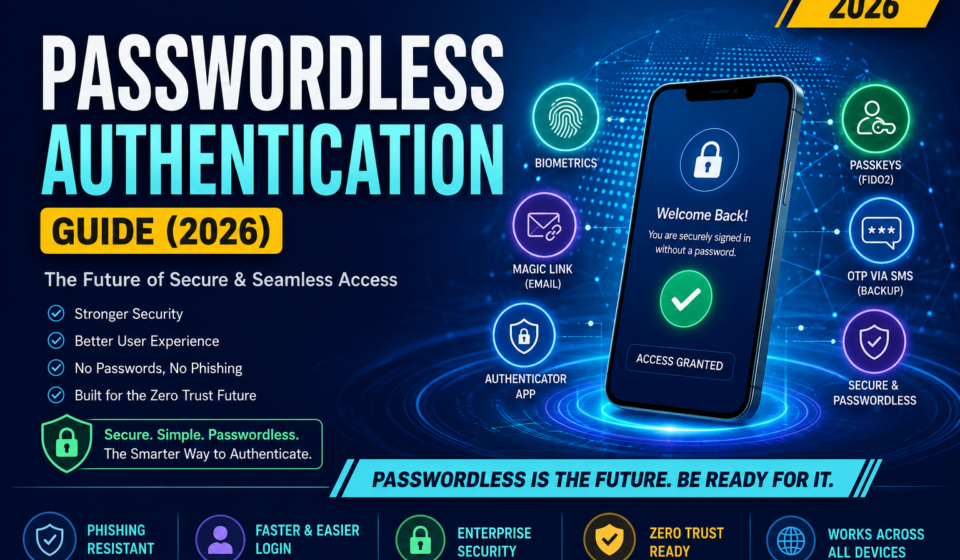

As cyber threats continue to evolve, traditional passwords are becoming one of the weakest links in digital security. Weak passwords, password reuse, phishing attacks, and credential theft cause millions of security breaches every year.
Passwordless authentication eliminates passwords entirely and replaces them with more secure authentication methods such as biometrics, security keys, passkeys, or one-time verification codes.
This guide explains everything you need to know about passwordless authentication, how it works, its benefits, implementation strategies, security best practices, and why organizations worldwide are adopting it.

Table of Contents
What is Passwordless Authentication?
Passwordless authentication is a login method that verifies a user’s identity without requiring a traditional password.
Instead of remembering passwords, users authenticate using:
- Biometrics
- Fingerprint
- Face recognition
- Passkeys
- Security keys
- One-Time Passwords (OTP)
- Mobile authentication apps
- Device-based cryptographic credentials
The authentication process relies on something you:
- Have (phone, hardware key)
- Are (biometric)
- Possess (trusted device)
rather than something you remember.
Why Passwords Are No Longer Enough
Traditional passwords have several weaknesses.
Common Problems
- Weak passwords
- Password reuse
- Credential stuffing
- Phishing attacks
- Keylogging malware
- Brute-force attacks
- Password leaks
- Social engineering
According to numerous cybersecurity reports, compromised credentials remain one of the leading causes of data breaches.
How Passwordless Authentication Works
Unlike passwords, passwordless authentication uses cryptographic authentication.
Typical workflow:
- User enters email or username.
- Server identifies the user.
- Authentication request is sent.
- User verifies identity using:
- Face ID
- Fingerprint
- Security Key
- Passkey
- Mobile approval
- Device signs a cryptographic challenge.
- Server validates the signature.
- Access is granted.
No password is transmitted or stored.
Types of Passwordless Authentication
1. Biometrics
Examples:
- Face Recognition
- Fingerprint
- Iris Scan
- Voice Recognition
Advantages:
- Fast
- Convenient
- Difficult to copy
2. Passkeys
Passkeys are cryptographic credentials stored securely on user devices and synchronized across trusted ecosystems.
Benefits:
- Resistant to phishing
- Easy login
- No password database
- Supports cross-device login
3. Hardware Security Keys
Examples include USB, NFC, or Bluetooth security keys based on the FIDO2 standard.
Advantages:
- Extremely secure
- Phishing-resistant
- Ideal for administrators and enterprises
4. Email Magic Links
Users receive a secure link via email.
Workflow:
- Enter email
- Click secure link
- Logged in
Best suited for:
- SaaS applications
- Customer portals
5. SMS OTP
Users receive a one-time code through SMS.
Although widely used, SMS-based authentication is less secure than passkeys because of SIM swap attacks.
6. Authenticator Apps
Applications generate temporary verification codes.
Popular examples include:
- Microsoft Authenticator
- Google Authenticator
- Authy
7. Push Notification Authentication
A notification appears on the user’s trusted device.
The user simply approves the request.
Passwordless Authentication Flow
User
   │
   ▼
Enter Email
   │
   ▼
Authentication Server
   │
   ▼
Send Authentication Challenge
   │
   ▼
User Device
   │
Biometric Verification
   │
Cryptographic Signature
   │
   ▼
Authentication Server
   │
Verify Signature
   │
   ▼
Access Granted
Passwordless vs Traditional Authentication
| Feature | Password-Based | Passwordless |
|---|---|---|
| Password Required | Yes | No |
| Phishing Resistance | Low | High |
| User Experience | Moderate | Excellent |
| Credential Theft Risk | High | Very Low |
| Password Reset Costs | High | Minimal |
| Security | Moderate | Excellent |
Benefits of Passwordless Authentication
Better Security
No passwords to steal or reuse.
Improved User Experience
Users authenticate in seconds using biometrics or passkeys.
Reduced IT Costs
Organizations spend less on password reset requests.
Stronger Compliance
Supports Zero Trust and modern cybersecurity frameworks.
Lower Risk of Phishing
Cryptographic authentication prevents credential theft.
Challenges
Although passwordless authentication has many benefits, organizations should consider:
- Legacy system compatibility
- Initial deployment cost
- User training
- Device dependency
- Backup authentication methods
What are Passkeys?
Passkeys are modern cryptographic credentials built on the FIDO2 and WebAuthn standards.
They replace passwords with public-key cryptography.
Registration
- Public key stored on server
- Private key stored securely on device
Login
Server sends challenge
↓
Device signs challenge
↓
Server verifies signature
↓
Access granted
Private keys never leave the user’s device.
Enterprise Implementation Guide
Step 1
Evaluate authentication requirements.
Step 2
Identify supported platforms.
Step 3
Enable WebAuthn or passkey support.
Step 4
Integrate identity provider.
Examples:
- Microsoft Entra ID
- Okta
- Ping Identity
- Duo Security
Step 5
Enroll users.
Step 6
Configure backup authentication.
Step 7
Monitor authentication logs.
Security Best Practices
✔ Enable passkeys wherever possible
✔ Use phishing-resistant authentication
✔ Register multiple authentication devices
✔ Keep operating systems updated
✔ Enable device encryption
✔ Monitor login anomalies
✔ Implement Zero Trust policies
✔ Disable legacy authentication
Industries Using Passwordless Authentication
Many sectors are rapidly adopting passwordless authentication:
- Banking
- Healthcare
- Government
- Education
- E-commerce
- Cloud Services
- IT Companies
- Manufacturing
- Telecommunications
- Financial Services
Future Trends (2026 and Beyond)
Emerging developments include:
- AI-powered adaptive authentication
- Password-free enterprise environments
- Wider passkey adoption
- Continuous authentication
- Behavioral biometrics
- Decentralized identity solutions
- Zero Trust integration
- Hardware-backed authentication by default
Frequently Asked Questions (FAQ)
Is passwordless authentication more secure?
Yes. Passwordless authentication significantly reduces phishing, credential theft, and password reuse risks.
Can passwordless authentication be hacked?
No authentication method is completely immune to attacks, but passwordless systems are generally much harder to compromise than password-based systems.
Are passkeys better than passwords?
Yes. Passkeys provide stronger security and a better user experience because they use public-key cryptography and are resistant to phishing.
Do I need biometrics for passwordless authentication?
No. Passwordless authentication can also use security keys, passkeys, email magic links, or authenticator apps.
Can small businesses use passwordless authentication?
Absolutely. Many cloud services and identity providers now support passwordless login with minimal setup.
Conclusion
Passwordless authentication is transforming digital security by replacing vulnerable passwords with secure, user-friendly authentication methods such as passkeys, biometrics, and hardware security keys. As organizations embrace Zero Trust architectures and users demand seamless experiences, passwordless authentication is becoming the preferred standard for protecting accounts and sensitive data.
Implementing passwordless authentication not only strengthens security but also reduces operational costs, improves user satisfaction, and prepares organizations for the future of identity management.
Suggested Internal Links
- Multi-Factor Authentication (MFA)
- Identity and Access Management (IAM)
- Zero Trust Security
- Endpoint Detection and Response (EDR)
- VPN Explained
- Network Security
Authoritative External Resources
- National Institute of Standards and Technology (NIST): https://www.nist.gov/
- FIDO Alliance: https://fidoalliance.org/
- WebAuthn Specification (W3C): https://www.w3.org/TR/webauthn-/
- OWASP Authentication Cheat Sheet: https://cheatsheetseries.owasp.org/cheatsheets/Authentication_Cheat_Sheet.html
- Cybersecurity and Infrastructure Security Agency (CISA): https://www.cisa.gov/