


Introduction
Cyberattacks have become more sophisticated than ever. Traditional antivirus software can detect many known threats, but modern attackers often rely on fileless malware, stolen credentials, ransomware, and living-off-the-land techniques that evade signature-based detection.
As organizations support remote work, cloud services, and connected devices, every laptop, desktop, server, and mobile device becomes a potential entry point for attackers. These devices are collectively known as endpoints.
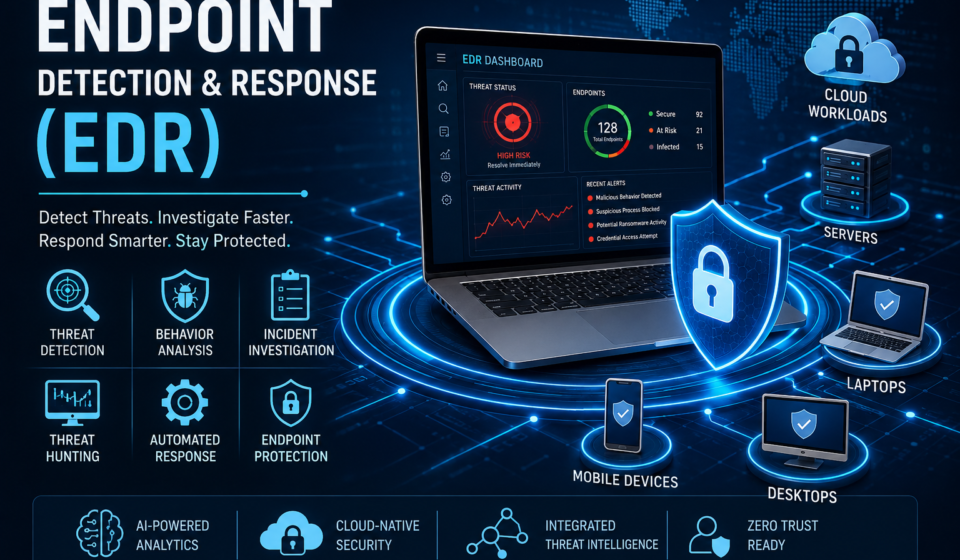
To defend them effectively, organizations increasingly deploy Endpoint Detection and Response (EDR) solutions. EDR goes beyond traditional antivirus by continuously monitoring endpoint activity, detecting suspicious behavior, investigating incidents, and enabling rapid response.
Table of Contents
What is Endpoint Detection and Response (EDR)?
Endpoint Detection and Response (EDR) is a cybersecurity technology that continuously monitors endpoint devices to identify, investigate, contain, and respond to cyber threats.
Unlike traditional antivirus software that primarily relies on known malware signatures, EDR analyzes endpoint behavior in real time to identify suspicious or malicious activity, even when the attack uses previously unseen techniques.
Typical endpoints include:
- Desktop computers
- Laptops
- Servers
- Virtual machines
- Mobile devices
- Cloud workloads
- Remote employee devices
An EDR platform records endpoint telemetry, correlates events, and helps security teams investigate and respond quickly to incidents.
What is an Endpoint?
An endpoint is any device connected to a network that can send or receive data.
Examples include:
- Windows PCs
- macOS computers
- Linux servers
- Smartphones
- Tablets
- Virtual desktops
- Cloud virtual machines
- Internet of Things (IoT) devices (where supported)
Because endpoints frequently access sensitive information, they are common targets for attackers.
Why Endpoint Security is Important
Many successful cyberattacks begin with a compromised endpoint.
Common attack scenarios include:
- Phishing emails that deliver malware
- Stolen user credentials
- Exploitation of software vulnerabilities
- USB-based malware
- Remote Desktop Protocol (RDP) attacks
- Fileless malware using legitimate system tools
- Insider threats
Without effective endpoint monitoring, attackers may remain undetected for extended periods.
Evolution of Endpoint Protection
Traditional Antivirus
Early antivirus software focused on identifying malware using known signatures.
Advantages:
- Lightweight
- Effective against known malware
Limitations:
- Limited visibility
- Difficulty detecting zero-day attacks
- Limited behavioral analysis
- Minimal investigation capability
Next-Generation Antivirus (NGAV)
NGAV introduced:
- Behavioral detection
- Machine learning
- Cloud intelligence
- Exploit prevention
While more capable than traditional antivirus, NGAV is primarily preventive.
Endpoint Detection and Response (EDR)
EDR adds continuous monitoring and response capabilities.
Key enhancements include:
- Continuous endpoint visibility
- Threat investigation
- Attack timeline reconstruction
- Automated containment
- Threat hunting
- Incident response support
How Endpoint Detection and Response Works
An EDR platform typically follows this workflow:
Step 1: Data Collection
An endpoint agent collects telemetry such as:
- Running processes
- File activity
- Registry changes
- Network connections
- User logins
- PowerShell activity
- Command-line execution
Step 2: Continuous Monitoring
The collected information is continuously analyzed for suspicious behavior.
Examples include:
- Unexpected privilege escalation
- Credential dumping attempts
- Unauthorized script execution
- Abnormal outbound connections
Step 3: Threat Detection
Detection methods may include:
- Behavioral analytics
- Indicators of compromise (IOCs)
- Indicators of attack (IOAs)
- Machine learning
- Threat intelligence
- Heuristic analysis
Step 4: Investigation
Security analysts can review:
- Attack timelines
- Process trees
- File modifications
- Network communications
- User activity
This context helps determine how an incident occurred and what systems were affected.
Step 5: Response
Common response actions include:
- Isolating compromised devices
- Terminating malicious processes
- Quarantining files
- Blocking indicators
- Collecting forensic evidence
- Triggering automated remediation
Core Components of an EDR Platform
1. Endpoint Agent
Installed on endpoints to collect security telemetry and enforce response actions.
2. Telemetry Collection
Captures detailed information about endpoint activity.
Examples:
- Process execution
- File access
- Registry changes
- Network traffic
- User logins
3. Analytics Engine
Correlates telemetry using:
- Artificial Intelligence
- Machine Learning
- Threat Intelligence
- Behavioral Models
4. Threat Intelligence
Matches endpoint activity against:
- Known malicious IP addresses
- Malware hashes
- Domains
- Indicators of compromise
5. Response Engine
Supports:
- Isolation
- Quarantine
- Process termination
- Automated playbooks
6. Investigation Console
Provides analysts with:
- Incident timelines
- Process relationships
- Alerts
- Search capabilities
- Evidence collection
Endpoint Detection and Response Architecture
                  Internet
                      │
                      ▼
               Threat Intelligence
                      │
                      ▼
      ┌──────────────────────────────┐
      │      EDR Cloud Platform      │
      │ • Analytics                  │
      │ • AI & Machine Learning      │
      │ • Threat Detection           │
      │ • Alert Correlation          │
      └──────────────────────────────┘
                ▲            ▲
                │            │
        Endpoint Telemetry   │
                │            │
      ┌─────────┴────────────┴─────────┐
      │                                │
 ┌──────────┐  ┌──────────┐  ┌──────────┐
 │ Laptop   │  │ Server   │  │ Desktop  │
 │ EDR Agent│  │ EDR Agent│  │ EDR Agent│
 └──────────┘  └──────────┘  └──────────┘
        │             │              │
        └─────────────┼──────────────┘
                      │
               Security Analyst
                      │
              Response Actions
Benefits of EDR
Organizations adopt EDR because it provides:
- Continuous endpoint visibility
- Early threat detection
- Faster incident response
- Improved forensic investigations
- Automated containment
- Reduced ransomware impact
- Threat hunting capabilities
- Better compliance support
- Centralized security management
Challenges of EDR
Despite its advantages, EDR implementation can present challenges.
These include:
- Large volumes of telemetry
- Alert fatigue
- Skilled personnel requirements
- Deployment planning
- Integration with existing security tools
- Ongoing tuning to reduce false positives
Organizations often pair EDR with trained security teams and well-defined incident response processes.
Real-World Example
Imagine an employee receives a phishing email containing a malicious attachment.
Without EDR:
- The malware executes.
- It steals credentials.
- It spreads laterally.
- Security teams may not notice until significant damage occurs.
With EDR:
- The suspicious process is detected.
- The endpoint is isolated.
- The malicious process is terminated.
- Related indicators are identified across other endpoints.
- Analysts investigate the full attack timeline.
- Remediation actions are initiated before widespread compromise.
Industries That Use EDR
EDR is widely adopted across sectors such as:
- Banking and Financial Services
- Healthcare
- Government
- Education
- Manufacturing
- Retail
- Telecommunications
- Energy and Utilities
- Information Technology
- Managed Security Service Providers (MSSPs)
Advanced Features of Endpoint Detection and Response (EDR)
Modern EDR solutions provide much more than malware detection. They continuously monitor endpoints, collect telemetry, analyze user and system behavior, and help security teams investigate and respond to threats quickly.
Key capabilities include:
- Continuous endpoint monitoring
- Real-time threat detection
- Behavioral analytics
- AI-assisted threat identification
- Threat intelligence integration
- Endpoint isolation
- Automated response
- Incident investigation
- Threat hunting
- Forensic data collection
- Attack visualization
- MITRE ATT&CK mapping
- Centralized management dashboard
- Cloud-based analytics
- Compliance reporting
Unlike traditional antivirus software, EDR focuses on understanding how an attack unfolds—not just whether a malicious file exists.
Continuous Endpoint Monitoring
EDR agents continuously monitor endpoint activities such as:
- Process creation
- Process termination
- Registry modifications
- File creation and deletion
- PowerShell execution
- Command Prompt activity
- Scheduled task creation
- Network connections
- User logins
- USB device usage
- Driver loading
- Service installation
This telemetry provides the context required to detect suspicious behavior.
Behavioral Analysis
Behavioral analysis is one of the most important capabilities of modern EDR.
Instead of looking only for known malware signatures, EDR evaluates how applications and users behave.
For example:
Normal behavior:
- Microsoft Word opens a document.
Suspicious behavior:
- Microsoft Word launches PowerShell.
- PowerShell downloads malware.
- Malware creates administrator accounts.
- Malware disables antivirus.
Even if the malware has never been seen before, the sequence of actions can indicate malicious activity.
Behavior-based detection is particularly effective against:
- Zero-day attacks
- Fileless malware
- Insider threats
- Living-off-the-land attacks
- Credential theft
Threat Detection Techniques
EDR combines several detection methods to improve accuracy.
1. Signature-Based Detection
Identifies known malware using signatures or hashes.
Advantages:
- Fast
- Accurate for known threats
Limitations:
- Ineffective against unknown malware
- Cannot detect many zero-day attacks
2. Heuristic Detection
Examines suspicious characteristics instead of exact signatures.
Example:
A program attempts to:
- Disable antivirus
- Modify system files
- Encrypt large numbers of documents
This behavior may indicate ransomware.
3. Behavioral Detection
Behavioral detection analyzes sequences of activities.
For example:
Email Attachment
        │
        ▼
Microsoft Word
        │
        ▼
PowerShell
        │
        ▼
Download Payload
        │
        ▼
Create Registry Persistence
        │
        ▼
Credential Dumping
        │
        ▼
Data Exfiltration
Rather than evaluating each action independently, EDR identifies the attack chain.
4. Machine Learning Detection
Machine learning helps detect:
- Unknown malware
- Abnormal user behavior
- Rare process execution
- Unusual network traffic
- Suspicious application relationships
Models are trained using large datasets to recognize patterns associated with malicious activity.
5. Threat Intelligence Matching
EDR platforms compare endpoint activity against external intelligence sources, including:
- Malicious IP addresses
- Known malware hashes
- Command-and-control (C2) servers
- Malicious domains
- File signatures
- Indicators of compromise
Indicators of Compromise (IOCs)
IOCs are observable pieces of evidence that suggest a system may have been compromised.
Examples include:
- Malicious file hashes
- Suspicious IP addresses
- Known malicious domains
- Registry changes
- Unexpected scheduled tasks
- Unauthorized administrator accounts
- Modified system files
IOCs help security teams identify attacks that have already occurred.
Indicators of Attack (IOAs)
IOAs focus on attacker behavior rather than artifacts.
Examples include:
- Credential dumping
- Lateral movement
- Privilege escalation
- PowerShell misuse
- Process injection
- Memory manipulation
- Persistence creation
Because IOAs detect attacker techniques, they are effective against previously unknown malware.
AI and Machine Learning in EDR
Artificial Intelligence significantly enhances EDR by automating analysis of large volumes of endpoint telemetry.
Common AI capabilities include:
- Anomaly detection
- Risk scoring
- Alert prioritization
- Malware classification
- Attack prediction
- Automated investigations
- Recommended response actions
Benefits include:
- Faster detection
- Reduced false positives
- Improved scalability
- Better analyst efficiency
AI supports analysts but should not replace human oversight.
Threat Intelligence Integration
Threat intelligence provides information about current cyber threats gathered from internal and external sources.
EDR solutions may consume intelligence related to:
- Malware families
- Ransomware campaigns
- Exploited vulnerabilities
- Threat actor infrastructure
- Indicators of compromise
- Attack techniques
This helps prioritize investigations and improve detection accuracy.
Threat Hunting
Threat hunting is the proactive search for hidden attackers within an environment.
Unlike alert-driven investigations, threat hunting assumes that an attacker may already be present.
Common hunting activities include:
- Searching for unusual PowerShell usage
- Identifying unauthorized remote access tools
- Looking for suspicious persistence mechanisms
- Investigating abnormal process trees
- Reviewing privileged account activity
- Examining unusual outbound connections
Threat hunting is often guided by frameworks such as the MITRE ATT&CK knowledge base.
Incident Investigation
When EDR generates an alert, analysts investigate by answering questions such as:
- What happened?
- Which endpoint was affected?
- Which user was involved?
- What process started the attack?
- Did the attacker move laterally?
- Were sensitive files accessed?
- Was data exfiltrated?
The investigation process uses telemetry collected by the EDR agent.
Attack Timeline Reconstruction
One of EDR’s strongest capabilities is reconstructing an attack from beginning to end.
Example:
08:15 User opens phishing email
        │
08:16 Word launches PowerShell
        │
08:17 Payload downloaded
        │
08:18 Malware executed
        │
08:19 Registry persistence created
        │
08:20 Credentials stolen
        │
08:22 Lateral movement begins
        │
08:24 EDR generates alert
        │
08:25 Endpoint isolated
A timeline helps analysts understand the sequence of events, determine the root cause, and assess the overall impact.
Digital Forensics
EDR supports forensic investigations by collecting artifacts such as:
- Process trees
- Memory information (where supported)
- Registry changes
- Event logs
- Network connections
- Executed commands
- File modifications
- User activity
These artifacts help determine how the attacker entered the environment and what actions were taken.
MITRE ATT&CK Mapping
Many EDR platforms map detections to techniques documented in the MITRE ATT&CK Framework.
Examples include:
| Attack Stage | Example Technique |
|---|---|
| Initial Access | Phishing |
| Execution | PowerShell |
| Persistence | Registry Run Keys |
| Privilege Escalation | Token Manipulation |
| Defense Evasion | Obfuscated Scripts |
| Credential Access | Credential Dumping |
| Discovery | Network Scanning |
| Lateral Movement | Remote Services |
| Collection | Archive Collected Data |
| Exfiltration | Exfiltration Over Web Services |
Mapping alerts to a common framework helps analysts communicate findings consistently and prioritize response efforts.
Practical Example
Imagine an employee opens a malicious email attachment.
- The attachment launches Microsoft Word.
- Word starts PowerShell.
- PowerShell downloads a payload.
- The payload creates persistence.
- It attempts credential theft.
- EDR detects the suspicious sequence.
- The endpoint is automatically isolated.
- Security analysts investigate the attack timeline.
- Malicious files are quarantined.
- Indicators are searched across all managed endpoints.
Without EDR, this attack might progress undetected for a longer period.
Best Practices
To maximize the value of EDR:
- Deploy agents on all supported endpoints.
- Keep EDR software updated.
- Integrate threat intelligence feeds.
- Enable automated containment where appropriate.
- Review and tune detection rules regularly.
- Train analysts on investigation workflows.
- Use Multi-Factor Authentication (MFA).
- Patch operating systems and applications promptly.
- Maintain reliable offline backups.
- Conduct periodic threat hunting exercises.
- Integrate EDR with SIEM and incident response processes where applicable.
EDR vs Traditional Antivirus
Traditional antivirus software primarily detects and blocks known malware using signature-based detection.
EDR provides broader visibility by continuously monitoring endpoint behavior, recording telemetry, investigating incidents, and enabling response actions.
| Feature | Antivirus | EDR |
|---|---|---|
| Known Malware Detection | ✅ | ✅ |
| Zero-Day Detection | Limited | Better through behavioral analysis |
| Behavioral Monitoring | ❌ | ✅ |
| Continuous Monitoring | ❌ | ✅ |
| Threat Investigation | ❌ | ✅ |
| Attack Timeline | ❌ | ✅ |
| Endpoint Isolation | ❌ | ✅ |
| Threat Hunting | ❌ | ✅ |
| Automated Response | Limited | ✅ |
Example
An employee downloads ransomware.
Traditional Antivirus
- Detects known ransomware signatures.
- May miss new variants.
EDR
- Detects suspicious encryption behavior.
- Records attack activity.
- Isolates the infected endpoint.
- Helps investigators determine the attack’s origin.
EDR vs Next-Generation Antivirus (NGAV)
NGAV improves on traditional antivirus by incorporating behavioral detection, exploit prevention, and machine learning to stop threats before they execute.
EDR focuses on detection, investigation, and response after suspicious activity begins.
| Feature | NGAV | EDR |
|---|---|---|
| Malware Prevention | ✅ | Limited |
| Behavioral Detection | ✅ | ✅ |
| Investigation Tools | Limited | Extensive |
| Endpoint Telemetry | Limited | Comprehensive |
| Threat Hunting | ❌ | ✅ |
| Attack Visualization | ❌ | ✅ |
| Automated Response | Limited | Advanced |
Many vendors combine NGAV and EDR into a single endpoint security platform.
EDR vs XDR
Extended Detection and Response (XDR) expands visibility beyond endpoints by correlating data from multiple security domains.
Typical XDR data sources include:
- Endpoints
- Identity systems
- Cloud workloads
- Firewalls
- Network devices
- Security gateways
- SaaS applications
Architecture
                   XDR Platform
                         │
     ┌───────────┬────────────┬────────────┐
     │           │            │            │
     ▼           ▼            ▼            ▼
 Endpoints    Email      Cloud      Identity
     │           │            │            │
     └───────────┴────────────┴────────────┘
                     │
                     ▼
            Unified Threat Detection
Comparison
| Feature | EDR | XDR |
|---|---|---|
| Endpoint Protection | ✅ | ✅ |
| Email Visibility | ❌ | ✅ |
| Cloud Visibility | Limited | ✅ |
| Identity Monitoring | Limited | ✅ |
| Network Telemetry | Limited | ✅ |
| Cross-Platform Correlation | ❌ | ✅ |
| Enterprise Visibility | Endpoint-focused | Organization-wide |
Organizations often adopt XDR as an evolution of EDR to improve visibility across their entire environment.
EDR vs MDR
Managed Detection and Response (MDR) is not a software product. It is a managed security service delivered by cybersecurity professionals.
An MDR provider typically uses technologies such as EDR, XDR, SIEM, and threat intelligence to monitor customer environments around the clock.
| Feature | EDR | MDR |
|---|---|---|
| Software Platform | ✅ | Uses security platforms |
| Human Analysts | Organization’s team | Provider’s SOC |
| 24×7 Monitoring | Depends on staffing | Usually included |
| Threat Hunting | Internal | Provider-managed |
| Incident Response | Internal | Assisted or managed |
| Security Expertise | Customer | Provider |
MDR is particularly valuable for organizations without a dedicated Security Operations Center (SOC).
EDR vs SIEM
A Security Information and Event Management (SIEM) platform collects and analyzes logs from many sources across an organization.
Typical SIEM log sources include:
- Firewalls
- Routers
- Switches
- Windows Event Logs
- Linux Logs
- Cloud Services
- Active Directory
- Applications
- Databases
- EDR Platforms
SIEM Workflow
Servers
Firewalls
Cloud
Applications
Endpoints
      │
      ▼
      SIEM
      │
      ▼
Alert Correlation
      │
      ▼
Security Analysts
Comparison
| Feature | EDR | SIEM |
|---|---|---|
| Endpoint Monitoring | ✅ | Limited |
| Log Aggregation | Limited | Extensive |
| Compliance Reporting | Limited | Excellent |
| Event Correlation | Endpoint-focused | Enterprise-wide |
| Investigation | Endpoint | Multiple log sources |
| Threat Hunting | Endpoint | Enterprise-wide |
EDR and SIEM are complementary technologies rather than direct competitors.
EDR vs SOAR
Security Orchestration, Automation, and Response (SOAR) automates repetitive security operations.
Typical SOAR functions include:
- Automated playbooks
- Ticket creation
- Incident enrichment
- Threat intelligence lookup
- Workflow automation
- Response orchestration
Example workflow:
EDR Alert
     │
     ▼
SOAR Playbook
     │
     ▼
Threat Intelligence Lookup
     │
     ▼
Endpoint Isolation
     │
     ▼
Notify Security Team
     │
     ▼
Create Incident Ticket
SOAR helps reduce manual effort and accelerates incident response, often using alerts generated by EDR or SIEM.
Complete Comparison Table
| Capability | Antivirus | NGAV | EDR | XDR | MDR | SIEM | SOAR |
|---|---|---|---|---|---|---|---|
| Malware Protection | ✅ | ✅ | ✅ | ✅ | Depends | ❌ | ❌ |
| Behavioral Detection | ❌ | ✅ | ✅ | ✅ | ✅ | Limited | ❌ |
| Endpoint Monitoring | ❌ | Limited | ✅ | ✅ | ✅ | Limited | ❌ |
| Email Security | ❌ | ❌ | ❌ | ✅ | Depends | Depends | Depends |
| Cloud Security | ❌ | ❌ | Limited | ✅ | Depends | Depends | Depends |
| Threat Hunting | ❌ | ❌ | ✅ | ✅ | ✅ | ✅ | ❌ |
| Incident Response | Limited | Limited | ✅ | ✅ | Managed | Limited | Automated |
| Log Management | ❌ | ❌ | Limited | Limited | Depends | ✅ | ❌ |
| Automation | ❌ | Limited | Limited | Moderate | Depends | Limited | Extensive |
Real-World Deployment Scenarios
Small Business
Recommended security stack:
- Next-Generation Antivirus
- EDR
- Multi-Factor Authentication (MFA)
- Cloud Backup
- Email Security
Medium Business
Recommended stack:
- EDR
- SIEM
- Vulnerability Management
- Threat Intelligence
- Secure VPN
- Identity Protection
Enterprise
Recommended stack:
- XDR
- SIEM
- SOAR
- Threat Intelligence
- Zero Trust Architecture
- Cloud Security Platform
- Identity and Access Management (IAM)
- Security Operations Center (SOC)
Industry Use Cases
Healthcare
- Protect patient records
- Detect ransomware
- Secure medical devices where supported
Banking
- Detect credential theft
- Prevent financial fraud
- Protect payment systems
Government
- Monitor sensitive endpoints
- Detect advanced persistent threats (APTs)
- Support regulatory compliance
Manufacturing
- Protect operational technology (OT) and IT environments
- Detect lateral movement
- Reduce operational downtime
Education
- Secure student devices
- Monitor remote learning endpoints
- Protect research data
Common Mistakes When Choosing an EDR
Avoid these common pitfalls:
- Choosing based only on price
- Ignoring deployment complexity
- Not integrating with existing security tools
- Failing to train security staff
- Disabling automated response without a plan
- Neglecting regular policy tuning
- Assuming EDR replaces backups or patch management
An effective security strategy combines technology, skilled personnel, and well-defined processes.
Best EDR Solutions in 2026
The EDR market offers many capable products. The best choice depends on your organization’s size, existing technology stack, regulatory requirements, and available security expertise.
1. Microsoft Defender for Endpoint
Best For
Organizations using Windows, Microsoft 365, and Azure.
Key Features
- AI-powered threat detection
- Automated investigation and remediation
- Threat intelligence integration
- Vulnerability management
- Identity protection integration
- Cloud-based management
- Endpoint isolation
- Threat analytics
Advantages
- Excellent Windows integration
- Strong enterprise capabilities
- Native Microsoft ecosystem support
- Comprehensive reporting
Considerations
- Organizations using diverse operating systems should evaluate cross-platform support based on their environment.
2. CrowdStrike Falcon
One of the most widely adopted cloud-native EDR platforms.
Features
- Lightweight endpoint agent
- Cloud-native architecture
- Behavioral AI
- Threat hunting
- Managed threat hunting services
- Real-time response
- Threat intelligence
Advantages
- Fast deployment
- High scalability
- Strong detection capabilities
- Minimal endpoint performance impact
3. SentinelOne Singularity
Highlights
- Autonomous AI detection
- Automated remediation
- Rollback support (where applicable)
- Ransomware protection
- Threat hunting
- Cloud management
Suitable for organizations seeking a high degree of automation.
4. Palo Alto Networks Cortex XDR
Cortex XDR extends visibility beyond endpoints by correlating endpoint, network, and cloud telemetry.
Features
- Endpoint protection
- Network analytics
- Cloud visibility
- Attack correlation
- AI-powered detection
- Threat investigation
5. Sophos Intercept X with XDR
Known for:
- Anti-ransomware protection
- Deep learning malware detection
- Exploit prevention
- Managed detection options
- Cloud console
6. Trend Micro Vision One
Provides:
- Extended detection and response
- Email security integration
- Endpoint security
- Cloud security
- Threat intelligence
7. Cisco Secure Endpoint
Features include:
- Malware detection
- Device trajectory
- File trajectory
- Threat intelligence
- Endpoint isolation
- Incident investigation
8. VMware Carbon Black
Popular in enterprise environments for:
- Endpoint telemetry
- Threat hunting
- Behavioral analytics
- Cloud-native security
- Incident response
Feature Comparison
| Solution | Cloud-Based | AI Detection | Threat Hunting | Automated Response | Cross-Platform |
|---|---|---|---|---|---|
| Microsoft Defender | ✅ | ✅ | ✅ | ✅ | ✅ |
| CrowdStrike Falcon | ✅ | ✅ | ✅ | ✅ | ✅ |
| SentinelOne | ✅ | ✅ | ✅ | ✅ | ✅ |
| Cortex XDR | ✅ | ✅ | ✅ | ✅ | ✅ |
| Sophos Intercept X | ✅ | ✅ | ✅ | ✅ | ✅ |
| Trend Vision One | ✅ | ✅ | ✅ | ✅ | ✅ |
| Cisco Secure Endpoint | ✅ | ✅ | ✅ | ✅ | ✅ |
| VMware Carbon Black | ✅ | ✅ | ✅ | ✅ | ✅ |
How to Choose the Right EDR
When evaluating EDR platforms, consider:
Organization Size
Small businesses may prioritize ease of deployment and managed services, while enterprises often require advanced integration and customization.
Existing Infrastructure
Choose a solution that integrates well with your:
- Identity platform
- Email security
- SIEM
- Cloud providers
- Firewalls
- Vulnerability scanners
Compliance Requirements
Consider regulations such as:
- GDPR
- HIPAA
- PCI DSS
- ISO/IEC 27001
- NIST Cybersecurity Framework
Detection Quality
Evaluate:
- Behavioral analytics
- Threat intelligence
- MITRE ATT&CK coverage
- False-positive rates
- Investigation capabilities
EDR Deployment Architecture
                   Internet
                        │
                        ▼
                 Threat Intelligence
                        │
                        ▼
             Cloud EDR Management Console
                        │
      ┌─────────────────┼──────────────────┐
      │                 │                  │
      ▼                 ▼                  ▼
 Laptop Agent      Server Agent      Desktop Agent
      │                 │                  │
      └─────────────────┼──────────────────┘
                        │
                        ▼
                 Security Operations Center
                        │
        Incident Investigation & Response
Step-by-Step Deployment Guide
Step 1 – Inventory Endpoints
Identify:
- Laptops
- Desktops
- Servers
- Virtual machines
- Cloud workloads
- Supported mobile devices
Step 2 – Risk Assessment
Determine:
- Critical systems
- Sensitive data
- High-risk users
- Internet-facing assets
Step 3 – Pilot Deployment
Deploy EDR to a small group of users.
Verify:
- Performance
- Compatibility
- Alert quality
- Reporting
Step 4 – Organization-Wide Rollout
Deploy agents in phases.
Monitor:
- CPU usage
- Memory consumption
- Alert volume
- User feedback
Step 5 – Configure Policies
Examples:
- Malware detection
- USB restrictions
- Isolation policies
- Automated response
- Threat intelligence updates
Step 6 – Train Security Teams
Security analysts should understand:
- Investigation workflows
- Threat hunting
- Incident response
- Alert prioritization
Enterprise Best Practices
- Keep EDR agents updated.
- Enable tamper protection where available.
- Review alerts daily.
- Tune detection rules regularly.
- Integrate with SIEM and identity systems.
- Test incident response plans.
- Conduct threat hunting exercises.
- Maintain offline backups.
- Enforce Multi-Factor Authentication (MFA).
- Apply timely security patches.
- Follow least-privilege access principles.
- Segment networks to limit lateral movement.
Common Deployment Mistakes
Avoid:
- Deploying without testing
- Ignoring alert tuning
- Running outdated agents
- Failing to train analysts
- Overlooking Linux and macOS endpoints
- Disabling telemetry unnecessarily
- Ignoring cloud workloads
- Treating EDR as a replacement for backups, patching, or user awareness
Licensing and Cost Considerations
Pricing models vary by vendor and may depend on:
- Number of protected endpoints
- Feature tiers
- Managed services
- Cloud storage for telemetry
- Threat intelligence options
- Support levels
When comparing vendors, evaluate the total cost of ownership rather than license price alone.
Integration with Other Security Tools
An effective EDR deployment often integrates with:
- Identity and Access Management (IAM)
- Multi-Factor Authentication (MFA)
- SIEM
- SOAR
- Threat Intelligence Platforms
- Vulnerability Management
- Email Security
- Cloud Security Posture Management (CSPM)
- Security Operations Center (SOC)
Integrated security controls provide better visibility and faster response than isolated tools.
Real-World Case Study 1 – Ransomware Prevention
Scenario
A finance employee unknowingly opens a malicious email attachment.
EDR Response
- Suspicious PowerShell activity detected.
- Ransomware behavior identified.
- Endpoint isolated automatically.
- Malicious process terminated.
- Indicators shared across managed endpoints.
- Security team investigates and remediates affected systems.
Outcome: Early containment limits the impact and reduces downtime.
Real-World Case Study 2 – Insider Threat
Scenario
An employee attempts to copy sensitive company files to an unauthorized cloud storage service.
EDR Detection
- Unusual file access patterns
- Large outbound data transfer
- Suspicious process activity
Outcome: Security analysts investigate and take appropriate action according to organizational policies.
Return on Investment (ROI)
Organizations often realize value from EDR through:
- Reduced incident response time
- Faster threat detection
- Improved visibility
- Lower recovery costs
- Better regulatory readiness
- Reduced operational disruption
- Enhanced security team productivity
Actual results depend on deployment quality, staffing, and the broader security program.
Future Trends
The EDR landscape continues to evolve with:
- Greater AI-assisted analysis
- Expanded XDR capabilities
- Improved cloud-native architectures
- Automated investigation workflows
- Identity-focused threat detection
- Enhanced Zero Trust integration
- Better protection for hybrid work environments
The Future of Endpoint Detection and Response
Cybersecurity continues to evolve as attackers adopt automation, artificial intelligence, and increasingly sophisticated techniques. Endpoint Detection and Response is also evolving to provide broader visibility, faster response, and improved integration with modern security ecosystems.
Key trends include:
- AI-assisted threat detection
- Predictive analytics
- Identity-aware security
- Cloud-native management
- Autonomous response
- Integration with Extended Detection and Response (XDR)
- Zero Trust architectures
- Improved protection for hybrid and remote workforces
Rather than functioning as a standalone tool, EDR is becoming a core component of an integrated cybersecurity platform.
Artificial Intelligence in EDR
Artificial intelligence enhances EDR by helping analyze large volumes of endpoint telemetry more efficiently than manual methods alone.
AI capabilities may include:
- Behavioral anomaly detection
- Risk scoring
- Alert prioritization
- Malware classification
- Automated investigation assistance
- Threat correlation
- Detection of previously unseen attack patterns
Benefits include:
- Faster detection
- Reduced analyst workload
- Improved prioritization
- Better scalability
- More efficient investigations
Human analysts remain essential for validating findings, handling complex incidents, and making response decisions.
Zero Trust and EDR
Modern organizations increasingly adopt the Zero Trust principle:
Never Trust, Always Verify
EDR supports Zero Trust by:
- Monitoring every endpoint continuously
- Detecting suspicious activity
- Verifying device health
- Supporting least-privilege access
- Providing evidence for policy decisions
- Helping isolate compromised systems
A typical Zero Trust strategy combines:
- EDR
- Multi-Factor Authentication (MFA)
- Identity and Access Management (IAM)
- Device compliance
- Network segmentation
- Continuous monitoring
Cloud-Native Endpoint Security
Cloud-managed EDR platforms provide advantages such as:
- Centralized administration
- Remote deployment
- Rapid updates
- Threat intelligence sharing
- Scalability
- Simplified management for distributed environments
This model is especially valuable for organizations with remote or hybrid workforces.
EDR for Remote Work
Remote work has expanded the attack surface, making endpoint visibility more important than ever.
Challenges include:
- Home networks
- Public Wi-Fi
- Unmanaged devices
- Phishing campaigns
- Credential theft
- Lost or stolen laptops
EDR helps by:
- Monitoring devices regardless of location
- Detecting suspicious behavior
- Isolating compromised endpoints
- Supporting remote investigations
- Providing centralized visibility
Career Opportunities in EDR
Professionals with EDR expertise are in demand across industries.
Common job roles include:
| Role | Primary Responsibilities |
|---|---|
| SOC Analyst | Monitor alerts and investigate incidents |
| Endpoint Security Engineer | Deploy and manage EDR platforms |
| Cybersecurity Analyst | Analyze threats and improve defenses |
| Threat Hunter | Proactively search for hidden attackers |
| Incident Response Analyst | Investigate and contain security incidents |
| Digital Forensics Specialist | Collect and analyze digital evidence |
| Security Consultant | Advise organizations on endpoint security |
| Cloud Security Engineer | Secure cloud-hosted workloads |
Recommended Certifications
Recognized cybersecurity certifications include:
Entry-Level
- CompTIA Security+
- Google Cybersecurity Certificate
Intermediate
- CompTIA CySA+
- GIAC Certified Incident Handler (GCIH)
- Cisco CyberOps
Advanced
- CISSP
- GIAC Certified Forensic Analyst (GCFA)
- Certified Ethical Hacker (CEH)
- Offensive Security certifications (role-dependent)
Choose certifications based on your career goals and current experience level.
Best Practices Summary
For effective EDR deployment:
- Install agents on all supported endpoints.
- Keep operating systems and applications updated.
- Enable Multi-Factor Authentication (MFA).
- Review alerts regularly.
- Tune detection policies.
- Integrate with SIEM and identity platforms.
- Conduct periodic threat hunting.
- Test incident response plans.
- Maintain reliable backups.
- Train employees to recognize phishing attacks.
- Follow the principle of least privilege.
- Review security configurations periodically.
Frequently Asked Questions
What is Endpoint Detection and Response (EDR)?
EDR is a cybersecurity technology that continuously monitors endpoint devices, detects suspicious activity, supports investigation, and enables organizations to respond to cyber threats quickly.
Is EDR better than antivirus?
EDR provides broader visibility and response capabilities than traditional antivirus. Many organizations use EDR alongside preventive security controls for layered protection.
Does EDR stop ransomware?
EDR can help detect and contain ransomware activity early, but effective ransomware defense also requires backups, timely patching, user awareness, and other security measures.
Can small businesses use EDR?
Yes. Many vendors offer EDR solutions suitable for small and medium-sized businesses with cloud-based management and simplified deployment.
Does EDR replace SIEM?
No. EDR focuses on endpoint visibility, while SIEM aggregates and correlates logs from many sources across an organization. The two technologies are complementary.
What operating systems are supported?
Support varies by vendor, but leading platforms typically support Windows, Linux, macOS, and many cloud workloads.
Is EDR suitable for cloud environments?
Yes. Most enterprise EDR platforms support cloud-hosted virtual machines and hybrid environments.
How long does EDR deployment take?
This depends on organization size, infrastructure complexity, and rollout strategy. Many organizations begin with a pilot before expanding deployment.
Does EDR affect computer performance?
Modern EDR agents are generally designed to minimize performance impact, though resource usage varies by vendor and configuration.
Can EDR protect cloud workloads?
Many leading platforms support cloud workloads and virtual machines, but capabilities differ by product.
Should EDR be integrated with SIEM?
Yes. Combining EDR with SIEM improves visibility, investigation, and incident response across the environment.
Can EDR replace antivirus?
Many modern EDR platforms include antivirus capabilities, but organizations should verify the specific features of their chosen solution before replacing existing protection.
Does every organization need XDR?
Not necessarily. XDR is most beneficial when organizations need visibility across endpoints, cloud services, email, identities, and network infrastructure.
Is MDR better than EDR?
They serve different purposes. EDR is a technology platform, while MDR is a managed service that often uses EDR as part of its operations.
Should SIEM and EDR be used together?
Yes. SIEM provides centralized log collection and correlation, while EDR delivers detailed endpoint visibility. Together they improve detection and investigation capabilities.
Is EDR the same as antivirus?
No. Antivirus primarily blocks known malware, while EDR continuously monitors endpoint activity, detects suspicious behavior, supports investigation, and enables rapid response.
Does EDR stop ransomware?
EDR can help detect and contain ransomware activity early, but no single solution can guarantee prevention. It should be combined with backups, patch management, user awareness, and other security controls.
Can EDR protect remote workers?
Yes. Many modern EDR platforms are cloud-managed and can monitor protected endpoints regardless of their physical location.
Is EDR suitable for small businesses?
Many EDR solutions offer options suitable for small and medium-sized organizations, though deployment should align with budget, staffing, and risk profile.
Final Conclusion
Endpoint Detection and Response has become a cornerstone of modern cybersecurity. As organizations face increasingly sophisticated attacks, EDR provides continuous visibility into endpoint activity, enabling rapid detection, investigation, and response.
However, EDR should be viewed as one part of a broader defense strategy. Strong security combines endpoint protection with identity security, Zero Trust principles, network security, vulnerability management, employee awareness, and effective incident response planning.
Organizations that regularly update their security controls, train personnel, and integrate EDR into a layered security architecture are better positioned to detect, contain, and recover from cyber threats.