
The Complete History of Computer Viruses (1971–2026): Evolution, Types, Famous Examples & Prevention Guide

Computer viruses have transformed from harmless experiments into some of the most dangerous cybersecurity threats in modern history. Over the last five decades, cybercriminals have developed increasingly sophisticated malware capable of stealing sensitive information, encrypting data for ransom, disrupting businesses, and even targeting critical infrastructure.
Understanding the history of computer viruses helps explain how cyber threats evolved and why modern cybersecurity practices are more important than ever.
In this comprehensive guide, you’ll learn:
- The origin of computer viruses
- The evolution of malware from 1971 to 2026
- Major types of computer viruses
- Famous virus outbreaks
- Safe educational programming examples
- How viruses spread
- Modern cybersecurity protection techniques
Table of Contents
What Is a Computer Virus?
A computer virus is a malicious software program that attaches itself to legitimate files or applications. Once executed, it replicates itself by infecting other files or systems.
Unlike worms, viruses generally require user interaction, such as opening an infected file or running a compromised application.
A virus may:
- Corrupt files
- Delete important data
- Slow down computer performance
- Display unwanted messages
- Steal passwords
- Install additional malware
- Create backdoors for attackers

The Birth of Computer Viruses
1971 – Creeper: The First Self-Replicating Program
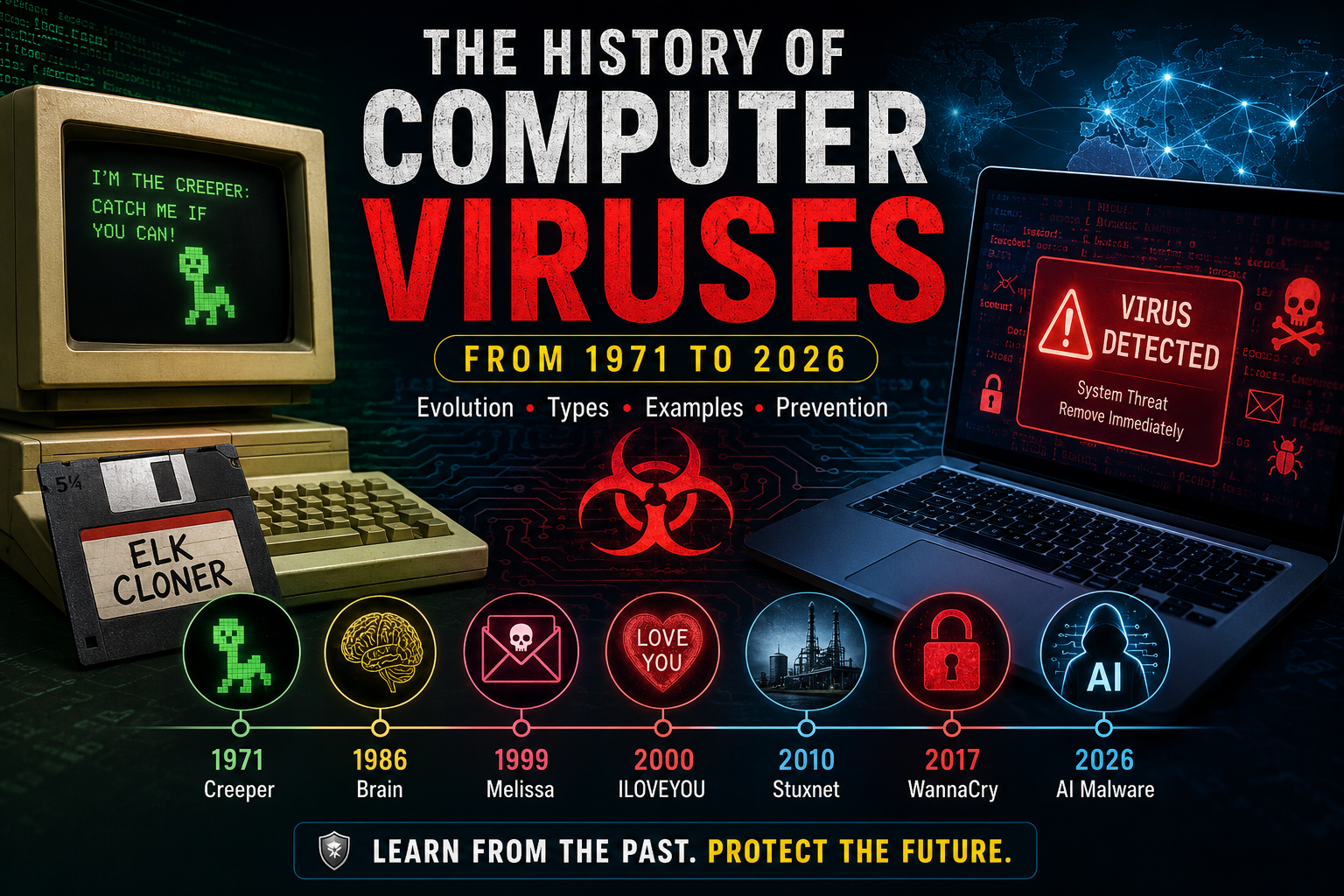
The history of computer viruses began in 1971 when Bob Thomas, an engineer at BBN Technologies, developed Creeper, the first known self-replicating program.
Instead of damaging computers, Creeper displayed the message:
I'm the Creeper: Catch me if you can!
It spread across ARPANET, the predecessor of today’s Internet, proving that programs could move between connected computers.
Why Creeper Was Important
Although it was not malicious, Creeper introduced the concept of self-replicating software—a foundation for future computer viruses.
1972 – Reaper: The First Antivirus
To remove Creeper, another program named Reaper was created.
Reaper searched for Creeper and deleted it, making it the world’s first antivirus software.
1982 – Elk Cloner
Created by 15-year-old Rich Skrenta, Elk Cloner infected Apple II computers through floppy disks.
Instead of destroying data, it displayed a humorous poem after the 50th system boot.
It became the first virus to spread widely among personal computers.
1986 – Brain Virus
Developed by Pakistani brothers Basit Farooq Alvi and Amjad Farooq Alvi, Brain became the first IBM PC boot sector virus.
Interestingly, the virus contained the developers’ names, address, and phone number.
Brain mainly spread through infected floppy disks.
Computer Virus Timeline (1971–2026)
| Year | Virus | Significance |
|---|---|---|
| 1971 | Creeper | First self-replicating program |
| 1972 | Reaper | First antivirus |
| 1982 | Elk Cloner | First PC virus |
| 1986 | Brain | First IBM PC virus |
| 1988 | Morris Worm | First major Internet worm |
| 1995 | Concept | First widespread macro virus |
| 1999 | Melissa | Email virus outbreak |
| 2000 | ILOVEYOU | Global email virus |
| 2001 | Code Red | Web server worm |
| 2003 | SQL Slammer | Fastest Internet worm |
| 2004 | Mydoom | Largest email worm |
| 2008 | Conficker | Massive Windows infection |
| 2010 | Stuxnet | Industrial cyberweapon |
| 2013 | CryptoLocker | Modern ransomware |
| 2017 | WannaCry | Global ransomware attack |
| 2017 | NotPetya | Destructive wiper malware |
| 2023–2026 | AI-Assisted Malware | AI-powered cyber threats |
Evolution of Computer Viruses
1980s: Floppy Disk Era
Viruses spread primarily through:
- Floppy disks
- Boot sectors
- Executable files
Examples:
- Brain
- Jerusalem
- Cascade
1990s: Document and Macro Viruses
With the popularity of Microsoft Office, macro viruses became widespread.
Examples:
- Concept
- Melissa
2000s: Internet Age
Always-on internet connections enabled rapid global malware outbreaks.
Notable malware:
- ILOVEYOU
- Code Red
- SQL Slammer
- Mydoom
2010s: Advanced Persistent Threats
Cyberattacks became more targeted and financially motivated.
Examples:
- Stuxnet
- CryptoLocker
- WannaCry
- NotPetya
2020s: AI and Cloud-Based Threats
Modern malware increasingly uses:
- Artificial intelligence
- Cloud infrastructure
- Fileless techniques
- Supply-chain compromises
- Social engineering
Major Types of Computer Viruses
1. Boot Sector Virus
Targets the Master Boot Record (MBR) or boot sector.
Example: Brain
2. File Infector Virus
Infects executable files such as .exe and .com.
Example: Jerusalem
3. Macro Virus
Targets Microsoft Office documents using VBA macros.
Example: Melissa
4. Resident Virus
Remains in memory and infects files automatically.
5. Direct Action Virus
Infects selected files only when executed and does not remain in memory.
6. Multipartite Virus
Infects both boot sectors and executable files.
7. Polymorphic Virus
Changes its code during each infection to evade signature-based detection.
8. Metamorphic Virus
Rewrites its own code completely while preserving its behavior, making detection more difficult.
9. Stealth Virus
Attempts to hide its presence by intercepting operating system requests.
10. Overwrite Virus
Overwrites the contents of infected files, often resulting in data loss.
Famous Virus Outbreaks
Melissa (1999)
Melissa spread through Microsoft Word documents and Microsoft Outlook, overwhelming email servers around the world.
ILOVEYOU (2000)
The email subject line “ILOVEYOU” tempted millions of users to open a malicious attachment.
Estimated damage exceeded billions of US dollars.
SQL Slammer (2003)
Only 376 bytes in size, SQL Slammer spread across the internet within minutes by exploiting vulnerable database servers.
Conficker (2008)
Conficker infected millions of Windows computers and formed one of the largest botnets ever observed.
Stuxnet (2010)
Stuxnet targeted industrial control systems and is widely recognized as the first malware designed to cause physical damage to industrial equipment.
WannaCry (2017)
WannaCry used the EternalBlue exploit to infect Windows systems worldwide.
It affected hospitals, businesses, universities, and government organizations in more than 150 countries.
How Computer Viruses Work
A simplified infection cycle looks like this:
User Opens an Infected File
            │
            ▼
Virus Executes
            │
            ▼
Copies Itself
            │
            ▼
Finds New Files
            │
            ▼
Infects Additional Files
            │
            ▼
Payload Activates
The payload may display a message, corrupt data, or perform other malicious actions depending on the malware’s design.
Safe Educational Code Example
The following Python script demonstrates a harmless educational simulation. It does not infect files or perform any malicious activity.
print("=" * 40)
print("Computer Virus Demonstration")
print("=" * 40)
print("This program demonstrates the concept of a virus.")
print("No files are modified.")
print("No malware is executed.")
Output:
========================================
Computer Virus Demonstration
========================================
This program demonstrates the concept of a virus.
No files are modified.
No malware is executed.
This type of example is useful for learning programming concepts without creating or distributing harmful software.
Virus vs Worm vs Trojan
| Feature | Virus | Worm | Trojan |
|---|---|---|---|
| Requires host file | ✅ | ❌ | ❌ |
| Self-replicates | ✅ | ✅ | ❌ |
| Needs user action | Usually | No | Usually |
| Disguises as legitimate software | Rarely | No | Yes |
| Example | Brain | Morris Worm | Zeus |
How Antivirus Software Detects Viruses
Modern antivirus software uses several complementary techniques:
- Signature-based detection: Compares files against known malware signatures.
- Heuristic analysis: Identifies suspicious code patterns.
- Behavior monitoring: Detects unusual actions, such as rapid file encryption.
- Cloud intelligence: Uses real-time threat databases.
- Machine learning: Identifies previously unseen malware based on behavior and characteristics.
How to Protect Yourself
Follow these cybersecurity best practices:
- Keep your operating system and software updated.
- Install trusted antivirus or endpoint protection.
- Enable a firewall.
- Download software only from reputable sources.
- Avoid opening unexpected email attachments or links.
- Use strong, unique passwords and enable multi-factor authentication.
- Back up important data regularly.
- Disable document macros unless they are from trusted sources.
The Future of Computer Viruses
The next generation of malware is expected to rely more on:
- Artificial intelligence for phishing and automation.
- Fileless techniques that operate in memory.
- Supply-chain attacks against trusted software vendors.
- Cloud infrastructure abuse.
- Internet of Things (IoT) device exploitation.
- Firmware-level persistence.
At the same time, defenders are adopting AI-driven detection, Endpoint Detection and Response (EDR), Extended Detection and Response (XDR), and Zero Trust security architectures to counter these evolving threats.
Frequently Asked Questions
What was the first computer virus?
The Creeper program (1971) is considered the first self-replicating program, while Elk Cloner (1982) is regarded as the first widely distributed personal computer virus.
Who created the first antivirus?
Reaper, developed in 1972 to remove Creeper, is widely recognized as the first antivirus program.
Is ransomware a computer virus?
Not necessarily. Ransomware is a type of malware that encrypts files for extortion. Some ransomware spreads using worm-like techniques rather than behaving as a traditional virus.
Can modern antivirus software stop all viruses?
No security solution is perfect. Combining updated security software with safe computing practices and regular backups provides the strongest protection.
Conclusion
The history of computer viruses illustrates how cyber threats have evolved from simple experimental programs into highly sophisticated attacks targeting individuals, businesses, and critical infrastructure. Understanding their origins, behavior, and evolution not only provides historical insight but also helps users adopt better cybersecurity practices. As technology advances, continuous awareness, timely software updates, and layered security defenses remain the most effective strategies for reducing cyber risk.
SEO Focus Keyword
Computer Virus History
Related SEO Keywords
computer virus, history of computer viruses, first computer virus, malware history, types of computer viruses, famous computer viruses, computer virus examples, boot sector virus, macro virus, ransomware history, cybersecurity, antivirus software, virus vs worm vs trojan, malware evolution, AI malware
Suggested Internal Links
- What Is Cybersecurity?
- How Antivirus Software Works
- Ransomware Explained
- Ethical Hacking Guide
- Types of Malware
Suggested External References
- Cybersecurity & Infrastructure Security Agency (CISA)
- National Institute of Standards and Technology (NIST)
- MITRE ATT&CK Framework
- Europol – Cybercrime Centre (EC3)
This structure is optimized for WordPress, uses SEO-friendly headings, includes keyword-rich sections, and is designed to perform well for informational search intent while remaining clear and readable for a broad audience.
References & External Resources
Staying informed about computer viruses and cybersecurity requires reliable and authoritative sources. The following organizations and resources provide up-to-date research, security advisories, technical documentation, and best practices related to malware, ransomware, and cyber threats.
1. Cybersecurity & Infrastructure Security Agency (CISA)
The Cybersecurity & Infrastructure Security Agency (CISA) is the United States government’s leading authority on cybersecurity. It provides comprehensive guidance on malware prevention, incident response, ransomware protection, and security best practices for individuals and organizations.
Visit:
CISA – Cybersecurity Best Practices
2. National Institute of Standards and Technology (NIST)
NIST develops globally recognized cybersecurity standards and frameworks used by governments, businesses, and security professionals. The NIST Cybersecurity Framework (CSF) is widely adopted for improving organizational cybersecurity resilience.
Visit:
NIST Cybersecurity Framework (CSF)
3. MITRE ATT&CK Framework
MITRE ATT&CK is one of the most respected knowledge bases for understanding how cyber attackers operate. It documents real-world adversary tactics, techniques, and procedures (TTPs) and is widely used by security teams around the world.
Visit:
MITRE ATT&CK Framework
4. Microsoft Security Blog
Microsoft’s Security Blog publishes detailed analyses of malware campaigns, ransomware attacks, zero-day vulnerabilities, and emerging cybersecurity threats affecting Windows, Microsoft 365, Azure, and enterprise environments.
Visit:
Microsoft Security Blog
5. Kaspersky Resource Center
Kaspersky provides educational articles explaining computer viruses, malware families, phishing attacks, ransomware, and practical security recommendations for home and business users.
Visit:
Kaspersky Resource Center
6. Cisco Talos Intelligence Group
Cisco Talos is one of the world’s largest commercial threat intelligence teams. It publishes in-depth malware research, vulnerability analyses, and security advisories based on real-world threat monitoring.
Visit:
Cisco Talos Intelligence Group
7. IBM X-Force Threat Intelligence
IBM X-Force offers advanced threat intelligence, cybersecurity reports, malware analysis, and research into emerging cyberattack trends affecting organizations globally.
Visit:
IBM X-Force Threat Intelligence
8. Cloudflare Learning Center
Cloudflare’s Learning Center explains cybersecurity concepts in an easy-to-understand format, including malware, DDoS attacks, ransomware, phishing, and web application security.
Visit:
Cloudflare Learning Center – Malware Guide
9. Computer History Museum
The Computer History Museum preserves the history of computing and documents the origins of early computer viruses, networking technologies, and significant milestones in computer science.
Visit:
Computer History Museum
10. Encyclopaedia Britannica – Computer Virus
Britannica provides a concise and reliable overview of computer viruses, their history, how they spread, and their impact on information technology.
Visit:
Encyclopaedia Britannica – Computer Virus
Recommended Further Reading
To expand your knowledge of cybersecurity and malware, consider exploring the following topics:
- Malware vs. Computer Virus: Understanding the Differences
- How Ransomware Works and How to Prevent It
- The Evolution of Cybersecurity from 1971 to Today
- AI-Powered Malware: Emerging Threats and Defensive Strategies
- Zero Trust Security Architecture Explained
- Ethical Hacking: Concepts, Tools, and Career Paths
- Endpoint Detection and Response (EDR) vs. Traditional Antivirus
- Phishing Attacks: Identification and Prevention
- The History of Antivirus Software
- Cybersecurity Best Practices for Individuals and Businesses
Citation Notice
This article is based on publicly available cybersecurity research, historical records, and technical documentation from trusted organizations. For the latest information on emerging malware, software vulnerabilities, and cybersecurity advisories, always refer to the official resources listed above.