
What Is Zero Trust Security? Complete Guide 2026 | Principles, Benefits & Implementation
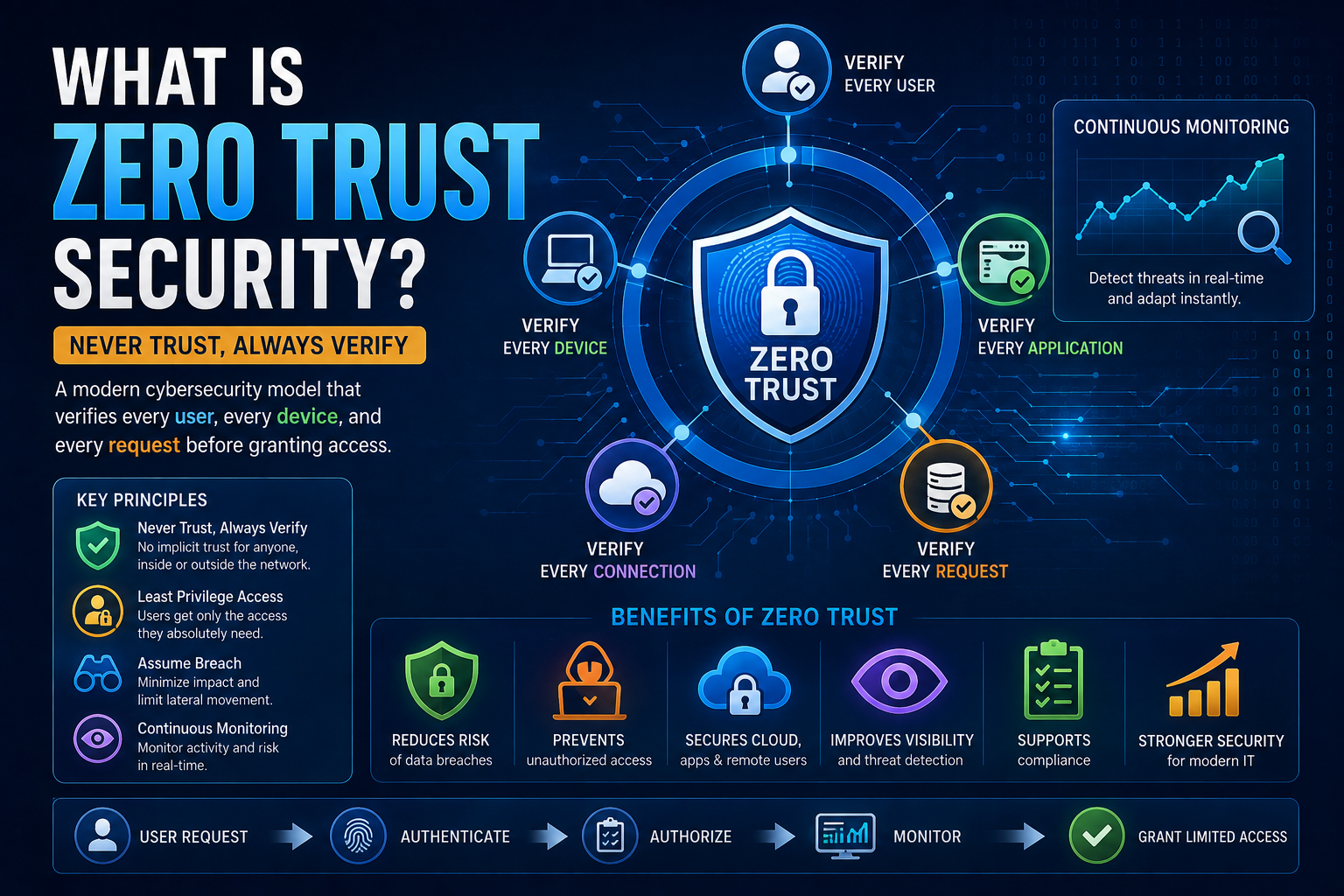
Zero Trust Security is a cybersecurity model based on the principle:
“Never Trust, Always Verify.”
Unlike traditional security models that automatically trust users and devices once they are inside a corporate network, Zero Trust assumes that no user, device, application, or network connection should be trusted by default, whether it originates inside or outside the organization’s network.
Every access request must be authenticated, authorized, and continuously validated before access is granted.
As businesses increasingly adopt cloud computing, remote work, mobile devices, and Internet of Things (IoT) technologies, Zero Trust has become one of the most effective approaches to protecting modern IT environments.
Why Is Zero Trust Security Important?
Traditional security relied on a secure network perimeter, often protected by firewalls.
However, today’s IT environments include:
- Cloud applications
- Remote employees
- Personal devices (BYOD)
- SaaS platforms
- IoT devices
- Hybrid cloud environments
Because users and data are distributed across many locations, attackers can no longer be stopped simply by protecting the network boundary.
Zero Trust minimizes risk by verifying every access request, regardless of its origin.
How Zero Trust Security Works
Whenever a user attempts to access a resource, the system evaluates multiple security factors before granting access.
Typical checks include:
- User identity
- Password verification
- Multi-Factor Authentication (MFA)
- Device health
- Operating system status
- Security patches
- Geographic location
- Network reputation
- User behavior
- Application sensitivity
Only after these checks succeed is access granted—and even then, only to the resources the user actually needs.
Zero Trust Authentication Process
User Requests Access
         │
         ▼
Identity Verification
         │
         ▼
Multi-Factor Authentication
         │
         ▼
Device Security Check
         │
         ▼
Risk Assessment
         │
         ▼
Access Policy Evaluation
         │
         ▼
Limited Access Granted
         │
         ▼
Continuous Monitoring
Core Principles of Zero Trust
1. Never Trust, Always Verify
Every request is verified before access is allowed.
No implicit trust exists based on:
- Network location
- Device ownership
- Previous authentication
2. Least Privilege Access
Users receive only the minimum permissions necessary to perform their work.
Example:
A marketing employee should not automatically have access to payroll databases.
3. Verify Explicitly
Organizations verify:
- User identity
- Device compliance
- Risk level
- Security posture
- Authentication strength
before granting access.
4. Assume Breach
Zero Trust assumes attackers may already be inside the network.
Security focuses on:
- Limiting movement
- Detecting suspicious activity
- Containing attacks quickly
5. Continuous Monitoring
Security verification continues throughout the user session.
If risk changes—for example, a device becomes compromised or a login occurs from an unusual location—the system can:
- Request MFA again
- Restrict access
- End the session
- Alert administrators
Components of a Zero Trust Architecture
A complete Zero Trust strategy typically includes:
Identity and Access Management (IAM)
Manages users, identities, authentication, and authorization.
Multi-Factor Authentication (MFA)
Requires more than one verification factor, such as:
- Password
- Mobile authenticator
- Security key
- Biometrics
Endpoint Security
Protects laptops, desktops, mobile devices, and servers.
Network Segmentation
Divides networks into smaller security zones to limit attacker movement.
Device Trust
Evaluates:
- Device health
- Security software
- Encryption status
- Patch levels
before allowing access.
Continuous Monitoring
Collects logs from:
- Users
- Devices
- Applications
- Networks
- Cloud environments
to detect suspicious behavior.
Benefits of Zero Trust Security
- Reduces the risk of unauthorized access.
- Protects remote and hybrid work environments.
- Limits the impact of compromised accounts.
- Reduces insider threats.
- Improves cloud security.
- Supports regulatory compliance.
- Minimizes lateral movement by attackers.
- Enhances visibility into user and device activity.
Zero Trust vs Traditional Security
| Feature | Traditional Security | Zero Trust Security |
|---|---|---|
| Trust Model | Trust inside the network | Trust no one by default |
| Authentication | Often once per session | Continuous verification |
| Access Control | Broad network access | Least privilege access |
| Remote Work | More difficult to secure | Designed for remote access |
| Insider Threat Protection | Limited | Stronger |
| Lateral Movement | Easier for attackers | Restricted through segmentation |
| Monitoring | Periodic | Continuous |
Real-World Example
An employee attempts to access a finance application from an unfamiliar laptop while traveling abroad.
A Zero Trust system may:
- Verify the employee’s identity.
- Require MFA.
- Check whether the laptop meets security requirements.
- Assess the login location and risk.
- Grant only finance application access if all checks pass.
- Continuously monitor the session for suspicious behavior.
If the risk level increases during the session, access can be limited or revoked automatically.
Best Practices for Implementing Zero Trust
- Enforce Multi-Factor Authentication (MFA).
- Apply least privilege access.
- Segment networks to reduce lateral movement.
- Monitor user and device behavior continuously.
- Keep systems patched and up to date.
- Encrypt sensitive data in transit and at rest.
- Use Endpoint Detection and Response (EDR) solutions.
- Regularly review and update access policies.
Challenges
Organizations may encounter:
- Legacy systems that lack modern authentication.
- Complex deployment in large environments.
- User training requirements.
- Initial implementation costs.
- Ongoing policy management.
Despite these challenges, Zero Trust provides significant long-term security benefits.
Frequently Asked Questions
Is Zero Trust a product?
No. Zero Trust is a security strategy and architecture, not a single software product. Organizations implement it using multiple technologies and security controls.
Does Zero Trust eliminate cyberattacks?
No. It reduces the likelihood and impact of attacks by verifying every access request and limiting what attackers can do if they gain access.
Is Zero Trust only for large enterprises?
No. Businesses of all sizes can adopt Zero Trust principles, though the technologies and implementation scale may differ.
Does Zero Trust replace firewalls?
No. Firewalls remain valuable, but Zero Trust adds identity-based verification, least-privilege access, and continuous monitoring beyond traditional perimeter defenses.
Conclusion
Zero Trust Security is a modern cybersecurity approach designed for today’s cloud-first, remote-work, and hybrid IT environments. By assuming that no user or device should be trusted automatically and requiring continuous verification, organizations can significantly reduce the risk of unauthorized access, insider threats, and data breaches.
As cyber threats continue to evolve, Zero Trust has become a foundational strategy for building resilient and adaptive security programs.
References & Further Reading
To learn more about Zero Trust Security and modern cybersecurity best practices, explore these trusted resources from leading organizations.
1. NIST Zero Trust Architecture (SP 800-207)
The National Institute of Standards and Technology (NIST) defines the core principles and architecture of Zero Trust Security in its official publication, SP 800-207.
🔗 https://csrc.nist.gov/pubs/sp/800/207/final
2. NIST Cybersecurity Framework (CSF 2.0)
The NIST Cybersecurity Framework helps organizations identify, protect, detect, respond to, and recover from cybersecurity threats.
🔗 https://www.nist.gov/cyberframework
3. CISA Zero Trust Maturity Model
The Cybersecurity and Infrastructure Security Agency (CISA) provides practical guidance for organizations planning and implementing a Zero Trust strategy.
🔗 https://www.cisa.gov/zero-trust-maturity-model
4. Microsoft Zero Trust Security
Microsoft explains how Zero Trust principles help secure identities, devices, applications, networks, infrastructure, and data in modern enterprise environments.
🔗 https://www.microsoft.com/security/business/zero-trust
5. Google Cloud BeyondCorp Enterprise
Google’s BeyondCorp Enterprise demonstrates how Zero Trust enables secure access to applications and resources without relying on a traditional network perimeter.
🔗 https://cloud.google.com/security/products/beyondcorp-enterprise
6. Cisco Zero Trust
Cisco provides detailed resources on Zero Trust networking, secure access, identity verification, and enterprise security solutions.
🔗 https://www.cisco.com/site/us/en/products/security/zero-trust/index.html
7. IBM – What Is Zero Trust?
IBM offers a beginner-friendly explanation of Zero Trust Security, including its principles, benefits, and enterprise use cases.
🔗 https://www.ibm.com/think/topics/zero-trust
8. OWASP (Open Worldwide Application Security Project)
OWASP publishes free resources, security standards, and best practices for building and maintaining secure web applications.
9. MITRE ATT&CK Framework
MITRE ATT&CK is a globally recognized knowledge base of cyber adversary tactics, techniques, and procedures (TTPs) used for threat detection and incident response.
10. ENISA (European Union Agency for Cybersecurity)
ENISA provides cybersecurity reports, threat intelligence, guidance, and research to strengthen cybersecurity across Europe.
🔗 https://www.enisa.europa.eu/

vkgandhig
Technology, AI and Cyber Security Updates.
Leave a Reply