
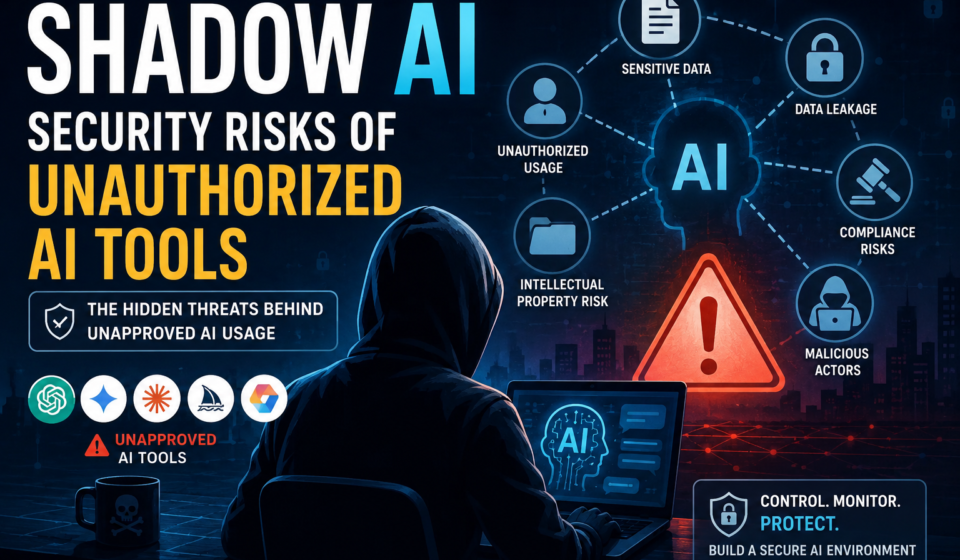

Shadow AI is becoming a major cybersecurity challenge as employees increasingly use artificial intelligence tools at work without formal approval from their organization’s IT or security teams.
Employees may use AI chatbots to summarize documents, AI coding assistants to debug software, AI writing tools to create content, or AI-powered applications to analyze business data. While these tools can significantly improve productivity, unauthorized AI usage can create serious data security, privacy, compliance, and cybersecurity risks.
In this complete guide, you’ll learn what Shadow AI is, why employees use unauthorized AI tools, the biggest Shadow AI security risks, real-world examples, how organizations can detect Shadow AI, and the best practices for managing it safely.

Table of Contents
What Is Shadow AI?
Shadow AI is the use of artificial intelligence tools, applications, or services without authorization or oversight from an organization’s IT, cybersecurity, privacy, or management teams.
It is similar to Shadow IT, where employees use unauthorized software, cloud services, devices, or applications.
The difference is that Shadow AI specifically involves AI-powered technologies.
Examples of Shadow AI include:
- Unapproved AI chatbots
- AI writing tools
- AI coding assistants
- AI image generators
- AI transcription tools
- AI meeting assistants
- AI document summarizers
- AI browser extensions
- AI research tools
- AI automation platforms
- AI data-analysis services
The security problem is not necessarily that an AI tool is malicious.
The problem is that the organization may not know what data employees are sending to the tool, how that data is processed, where it is stored, or who can access it.
Why Is Shadow AI Becoming a Security Problem?
AI tools are easy to access.
An employee can often open a browser, create an account, paste information into an AI application, and receive an answer within seconds.
This creates a gap between:
Employee Productivity → AI Adoption → Organizational Security Controls
If an organization has not established clear AI policies, employees may independently select tools that have never been reviewed by the security team.
This creates an AI security blind spot.
Example
Imagine a developer is debugging an internal application.
Instead of using an approved enterprise AI assistant, the developer copies part of the company’s source code into a public AI service.
The developer solves the problem quickly.
However, the organization may now have an information-security issue because proprietary source code was sent to an external service without authorization.
This is a typical Shadow AI scenario.
Why Do Employees Use Unauthorized AI Tools?
Understanding why Shadow AI happens is important because simply banning AI may not solve the problem.
Faster Productivity
AI can help employees complete tasks much faster.
For example, AI can:
- Summarize reports
- Write emails
- Generate code
- Analyze information
- Create presentations
- Translate text
- Generate ideas
- Automate repetitive tasks
When an AI application saves employees hours of work, they may start using it even if it has not been officially approved.
Easy Access
Most AI applications are available through a web browser.
Employees often do not need assistance from IT to begin using them.
Lack of Approved AI Tools
If an organization does not provide secure AI alternatives, employees may search for their own solutions.
This can increase Shadow AI adoption.
Lack of AI Security Awareness
Some employees may not realize that copying confidential information into an AI tool could create a security problem.
They may think:
“I’m only using AI to summarize this document.”
But from a security perspective, the important question is:
What information was sent to the AI system?
Shadow AI vs Shadow IT
Shadow AI is closely related to Shadow IT.
| Shadow IT | Shadow AI |
|---|---|
| Unauthorized software | Unauthorized AI tools |
| Unapproved cloud services | AI chatbots |
| Personal applications | AI coding assistants |
| File-sharing platforms | AI document analyzers |
| Unauthorized devices | AI browser extensions |
| Unapproved SaaS | AI automation platforms |
Shadow AI deserves special attention because AI applications are designed to process information and generate outputs from user-provided data.
Top Shadow AI Security Risks
1. Sensitive Data Leakage
One of the biggest Shadow AI security risks is accidental data leakage.
Employees may submit sensitive information such as:
- Customer information
- Employee records
- Financial information
- Internal documents
- Source code
- API keys
- Business plans
- Product designs
- Contracts
- Database information
- Authentication information
to unauthorized AI applications.
Once the information leaves the organization’s controlled environment, security teams may have limited visibility into how it is processed.
2. Confidential Information Exposure
Businesses have confidential information that should only be accessible to authorized people.
Examples include:
- Business strategies
- Internal reports
- Product roadmaps
- Marketing plans
- Research
- Pricing information
- Partnership agreements
Using unauthorized AI applications to process this information can increase exposure.
3. Intellectual Property Risks
Intellectual property is another major concern.
Software companies, technology organizations, research teams, and manufacturers may possess valuable proprietary information.
Developers using public AI coding assistants could accidentally expose:
- Proprietary source code
- Algorithms
- Architecture
- Internal APIs
- Database structures
- Technical documentation
Organizations should establish clear rules about what developers can submit to AI systems.
4. Privacy Risks
Employees may accidentally submit personal information to AI services.
This could include:
- Names
- Email addresses
- Phone numbers
- Customer conversations
- Employee information
- Financial information
- Other personally identifiable information
The privacy implications depend on the type of data, jurisdiction, organization, and AI provider.
5. Compliance Risks
Unauthorized AI usage can also create compliance problems.
Organizations may have requirements related to:
- Data protection
- Privacy
- Financial information
- Healthcare information
- Customer data
- Intellectual property
- Contractual obligations
If employees use AI services without authorization, the organization may have difficulty demonstrating appropriate controls.
6. Third-Party Data Exposure
An AI application may rely on multiple third-party services.
A simplified data flow could look like:
Employee → AI Application → AI Provider → Cloud Infrastructure → Third-Party Services
Organizations should understand where sensitive information goes before approving an AI service.
7. Weak AI Account Security
Employees may create personal accounts for AI applications.
These accounts might use:
- Personal email addresses
- Weak passwords
- Reused passwords
- Personal devices
- Unmanaged browsers
If the account is compromised, information stored in the account could also be exposed.
8. Malicious AI Applications
Not every AI application available online is trustworthy.
Attackers can create fake AI websites, browser extensions, applications, or services designed to steal:
- Passwords
- Credentials
- Cookies
- Documents
- API keys
- Personal information
Employees looking for free AI tools should therefore be cautious.
9. Malicious Browser Extensions
AI browser extensions can sometimes request broad browser permissions.
Depending on their permissions and implementation, extensions may interact with website content or information displayed in the browser.
Organizations should therefore evaluate AI browser extensions before allowing them on managed devices.
10. Prompt Injection Attacks
Shadow AI can also increase exposure to prompt injection attacks.
Prompt injection occurs when malicious instructions attempt to manipulate an AI system into performing actions that were not intended by the user or organization.
The risk becomes more serious when AI systems can access:
- Internal documents
- Emails
- Databases
- Cloud storage
- APIs
- Business applications
Organizations should therefore consider AI-specific attack techniques when developing security policies.
Real-World Examples of Shadow AI
Example 1: Developer Uploads Source Code
A developer encounters an error and copies proprietary code into an unauthorized AI coding assistant.
Risk: Intellectual-property and source-code exposure.
Example 2: Employee Uploads a Customer Spreadsheet
An employee wants AI to analyze customer data and uploads a spreadsheet containing customer information.
Risk: Privacy and data-protection exposure.
Example 3: HR Uses AI to Summarize Employee Complaints
An HR employee copies confidential employee communications into an unapproved AI chatbot.
Risk: Confidentiality and privacy concerns.
Example 4: Marketing Team Uses an Unapproved AI Tool
A marketing employee uploads an unreleased product announcement to generate promotional content.
Risk: Premature disclosure of confidential business information.
How to Detect Shadow AI
Organizations cannot effectively secure AI usage without first understanding what AI applications are being used.
1. Monitor Network Traffic
Security teams can monitor network traffic and DNS activity to identify connections to AI services.
2. Review SaaS Applications
Organizations should periodically review applications accessed by employees.
This can help identify unauthorized AI services.
3. Monitor Browser Extensions
IT teams should maintain visibility into installed browser extensions.
AI extensions that have not been reviewed should be investigated.
4. Use Data Loss Prevention
DLP solutions can help identify attempts to transfer sensitive information to unauthorized applications.
For example, organizations can create rules for detecting:
- Customer information
- Financial records
- Source code
- Credentials
- Confidential documents
5. Review Identity Logs
Identity and access logs can help identify unusual application access and account activity.
6. Conduct Employee Surveys
Technical monitoring alone may not discover every AI application.
Employees should be encouraged to report the AI tools they use.
How to Prevent Shadow AI
The best approach is usually not simply to block every AI service.
Instead, organizations should establish controlled and secure AI adoption.
1. Create an AI Acceptable-Use Policy
An AI acceptable-use policy should clearly explain:
- Which AI tools are approved
- Which AI tools are prohibited
- What data can be submitted
- What data cannot be submitted
- How AI-generated content should be handled
- How employees should report AI security incidents
2. Provide Approved AI Tools
Employees are more likely to follow security policies when approved AI tools are easy to access.
Organizations should provide secure solutions for common tasks such as:
- Writing
- Coding
- Research
- Document analysis
- Data analysis
- Meeting transcription
- Automation
3. Implement Data Classification
Employees should understand how information is classified.
A basic model could be:
Public → Internal → Confidential → Highly Sensitive
AI usage rules should be defined for each classification.
For example:
Public data: May be allowed in approved public AI services.
Internal data: May require an approved enterprise AI service.
Confidential data: May require additional authorization.
Highly sensitive data: May be prohibited from external AI services.
The exact rules should be determined by the organization.
4. Implement Strong Identity Security
Approved enterprise AI applications should ideally support:
- Multi-factor authentication
- Single sign-on
- Role-based access control
- Centralized account management
- Strong authentication policies
5. Evaluate AI Vendors
Before approving an AI service, organizations should evaluate:
- Data retention
- Data processing
- Encryption
- Security controls
- Access management
- Data residency
- Subprocessors
- Incident response
- Compliance requirements
- Contractual protections
6. Train Employees
Employee education is one of the most important defenses against Shadow AI.
Training should explain:
- What Shadow AI means
- Why unauthorized AI tools are risky
- What information employees must not submit
- Which AI tools are approved
- How to report suspicious AI applications
Security training should use practical examples instead of simply telling employees not to use AI.
7. Establish AI Governance
AI governance should involve multiple departments.
A typical governance model could include:
Cybersecurity + IT + Legal + Privacy + Compliance + Business Teams
These teams can work together to establish AI usage standards.
Shadow AI Security Framework
Organizations can use a simple framework:
Discover → Classify → Approve → Control → Monitor → Improve
Discover
Find out which AI tools employees are using.
Classify
Determine what type of information each AI application processes.
Approve
Evaluate AI providers and approve secure tools.
Control
Implement identity, access, DLP, and security controls.
Monitor
Continuously monitor AI usage and security events.
Improve
Regularly update policies as AI technology changes.
Shadow AI and Zero Trust
Zero Trust principles can also be applied to AI security.
Instead of automatically trusting an AI service, organizations should verify:
- Who is using it?
- What data is being submitted?
- Where is the data going?
- Why is the tool needed?
- How is the data protected?
This can help organizations reduce unnecessary AI-related risk.
Shadow AI Security Checklist
Use this checklist to improve your organization’s AI security:
- Create an AI acceptable-use policy
- Maintain an approved AI application list
- Discover unauthorized AI applications
- Classify sensitive data
- Implement DLP controls
- Require MFA
- Use centralized identity management
- Review AI vendors
- Monitor network traffic
- Monitor browser extensions
- Train employees
- Establish AI incident-response procedures
- Conduct periodic AI security audits
- Update AI policies regularly
Shadow AI vs Secure AI Adoption
The goal of cybersecurity teams should not necessarily be to eliminate AI.
Instead, organizations should make secure AI adoption easier than unauthorized AI adoption.
| Unsafe Approach | Secure Approach |
|---|---|
| Ban all AI | Provide approved AI tools |
| Ignore employee AI usage | Monitor AI adoption |
| No AI policy | Clear AI acceptable-use policy |
| Allow sensitive data everywhere | Apply data classification |
| Personal AI accounts | Managed enterprise accounts |
| No monitoring | Continuous monitoring |
| No employee training | Regular AI security awareness |
Future of Shadow AI Security
AI adoption is likely to continue expanding across organizations.
Employees will increasingly use AI for:
- Software development
- Marketing
- Research
- Customer service
- Data analysis
- Business automation
- Document processing
- Productivity
As AI becomes more deeply integrated into business workflows, organizations will need stronger AI governance and security controls.
Future Shadow AI defenses are likely to combine:
AI Governance + Identity Security + Data Protection + DLP + Employee Training + Continuous Monitoring
Frequently Asked Questions About Shadow AI
What is Shadow AI?
Shadow AI is the unauthorized or unapproved use of AI tools and services within an organization.
Why is Shadow AI dangerous?
Shadow AI can lead to sensitive-data leakage, privacy problems, intellectual-property exposure, compliance issues, and reduced security visibility.
What are examples of Shadow AI?
Examples include unauthorized AI chatbots, AI coding assistants, AI writing tools, AI browser extensions, AI transcription services, and AI document-analysis tools.
Is Shadow AI the same as Shadow IT?
Shadow AI is a specific category of Shadow IT focused on artificial intelligence applications.
Can Shadow AI cause a data breach?
Yes. If employees send confidential information to an insecure or unauthorized AI service, that information could potentially be exposed.
How can companies prevent Shadow AI?
Organizations can reduce Shadow AI through approved AI tools, clear policies, employee training, DLP, identity controls, vendor assessments, and continuous monitoring.
Should companies ban AI tools?
A complete AI ban may encourage employees to use unauthorized tools secretly. A controlled approach with approved and secure AI tools can be more effective.
What is the biggest Shadow AI security risk?
One of the most significant risks is unauthorized exposure of sensitive organizational data.
Conclusion
Shadow AI is becoming an important cybersecurity issue in the modern workplace.
The problem is not simply that employees are using artificial intelligence.
The bigger problem is that organizations may not know which AI tools employees are using, what information they are submitting, and how that information is being processed.
Organizations should therefore focus on secure AI adoption instead of simply banning AI.
A strong Shadow AI strategy should combine:
AI governance + employee education + data classification + identity security + vendor assessment + monitoring.
When organizations provide secure AI alternatives and establish clear rules, employees can benefit from artificial intelligence while reducing unnecessary cybersecurity risks.
Key Takeaway
Shadow AI is not just an AI problem. It is a data security, privacy, compliance, and cybersecurity problem.
The organizations that identify and manage Shadow AI early will be better prepared for the rapidly evolving AI-powered workplace.
Recommended External Sources
For credibility, use authoritative sources such as:
Internal Linking Opportunities