

In today’s digital world, organizations manage thousands of users, devices, applications, and cloud services. Ensuring that only authorized users can access the right resources has become one of the biggest cybersecurity challenges. This is where Identity and Access Management (IAM) plays a critical role.
Whether you’re a cybersecurity professional, IT administrator, developer, business owner, or student, understanding IAM is essential for protecting sensitive information and preventing cyberattacks.
In this comprehensive guide, you’ll learn:
- What Identity and Access Management (IAM) is
- Why IAM is important
- How IAM works
- IAM architecture
- Authentication vs Authorization
- IAM components
- Single Sign-On (SSO)
- Multi-Factor Authentication (MFA)
- Privileged Access Management (PAM)
- Zero Trust Security
- Cloud IAM
- Best IAM tools
- Best practices
- Future trends
Table of Contents
What is Identity and Access Management (IAM)?
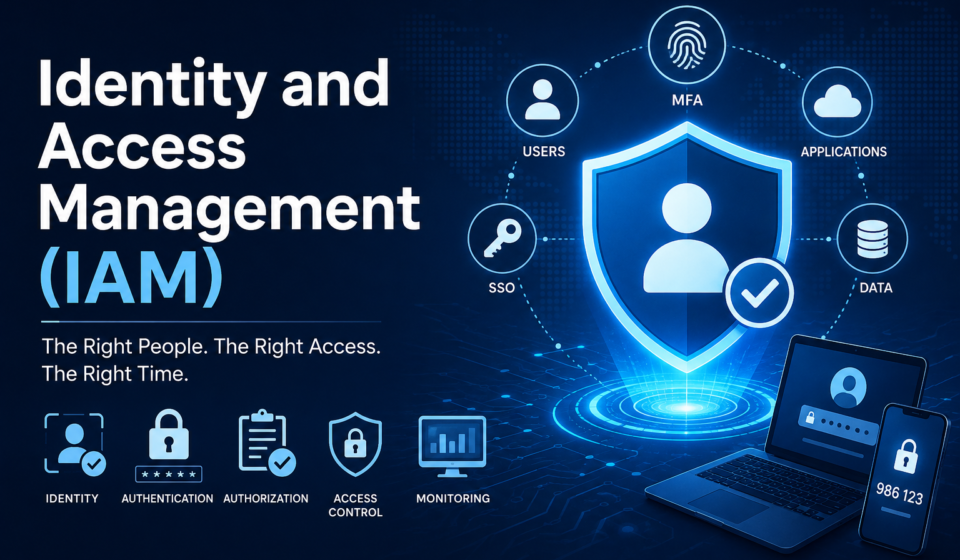
Identity and Access Management (IAM) is a cybersecurity framework consisting of policies, technologies, and processes used to ensure that the right users access the right resources at the right time for the right reasons.
IAM manages digital identities throughout their lifecycle while controlling access to applications, systems, databases, cloud platforms, and networks.
Simply put:
IAM answers three critical questions:
- Who are you?
- Can you prove it?
- What are you allowed to do?
Why is IAM Important?
Cybercriminals frequently exploit stolen credentials to gain unauthorized access. Modern organizations often rely on cloud services, remote work, mobile devices, and third-party integrations, making strong identity controls essential.
IAM helps organizations:
- Prevent unauthorized access
- Protect sensitive information
- Improve compliance
- Reduce insider threats
- Simplify user management
- Enable secure remote work
- Strengthen cloud security
- Improve employee productivity
How Identity and Access Management Works
A typical IAM workflow follows these steps:
User
   │
   ▼
Login Request
   │
   ▼
Identity Verification
(Password, MFA, Biometrics)
   │
   ▼
Authentication
   │
   ▼
Authorization Check
   │
   ▼
Access Policy Evaluation
   │
   ▼
Grant or Deny Access
   │
   ▼
Activity Logging & Monitoring
Every access request is validated before permission is granted.
Core Components of IAM
1. Identity Management
Creates and manages digital identities for:
- Employees
- Customers
- Contractors
- Vendors
- Applications
- Devices
2. Authentication
Authentication verifies a user’s identity.
Common authentication methods include:
- Password
- PIN
- One-Time Password (OTP)
- Authenticator App
- Fingerprint
- Face Recognition
- Smart Card
- Security Key
- Passkeys
3. Authorization
After authentication, authorization determines what resources a user can access.
Example:
Employee
✅ View payroll
❌ Modify payroll database
Manager
✅ View payroll
✅ Approve payroll
4. Access Control
IAM enforces access policies using different models.
Role-Based Access Control (RBAC)
Permissions are assigned based on job roles.
Example:
- HR
- Finance
- Sales
- IT Administrator
Attribute-Based Access Control (ABAC)
Access depends on attributes such as:
- Department
- Location
- Device
- Time
- Risk score
Mandatory Access Control (MAC)
Access decisions are based on security classifications.
Used in:
- Government
- Defense
- Military
Discretionary Access Control (DAC)
Resource owners determine who can access their resources.
Common in:
- Windows file systems
- Personal document sharing
Identity Lifecycle Management
Identity lifecycle includes:
- User onboarding
- Account creation
- Role assignment
- Permission updates
- Department transfer
- Temporary access
- Employee termination
- Account deletion
Automated lifecycle management reduces human error and minimizes orphaned accounts.
Single Sign-On (SSO)
Single Sign-On allows users to authenticate once and access multiple applications without logging in repeatedly.
Advantages
- Better user experience
- Fewer passwords
- Lower help desk costs
- Improved productivity
- Centralized authentication
Example:
Login once →
- CRM
- HR Portal
- Cloud Storage
- Collaboration Tools
Multi-Factor Authentication (MFA)
MFA requires two or more verification methods.
Authentication factors include:
Something You Know
- Password
- PIN
Something You Have
- Smartphone
- Security Key
- Smart Card
Something You Are
- Fingerprint
- Face Scan
- Iris Scan
MFA significantly reduces the risk of account compromise due to stolen passwords.
Privileged Access Management (PAM)
Privileged accounts have elevated permissions that can access critical infrastructure.
Examples include:
- Domain Administrator
- Cloud Administrator
- Database Administrator
- Root User
- Network Administrator
PAM helps organizations:
- Secure privileged accounts
- Rotate credentials
- Record privileged sessions
- Monitor administrative activity
- Enforce least privilege
Cloud IAM
Cloud providers offer built-in IAM capabilities to control access to cloud resources.
Major cloud platforms include:
- Amazon Web Services (AWS)
- Microsoft Azure
- Google Cloud Platform (GCP)
Common features include:
- Role management
- Policy-based access
- Temporary credentials
- API security
- Service accounts
- Identity federation
Zero Trust and IAM
Zero Trust follows the principle:
Never Trust, Always Verify
Rather than assuming users inside the corporate network are trusted, every access request is verified continuously.
IAM is a foundational component of a Zero Trust architecture by enabling:
- Strong authentication
- Device verification
- Least privilege
- Continuous monitoring
- Risk-based access decisions
Benefits of Identity and Access Management
Organizations implementing IAM gain several advantages:
- Stronger cybersecurity
- Improved regulatory compliance
- Reduced insider threats
- Faster onboarding and offboarding
- Enhanced user productivity
- Lower IT support costs
- Better visibility into user activities
- Simplified audit processes
- Centralized identity management
- Secure remote access
Popular IAM Solutions
Some widely used IAM platforms include:
- Microsoft Entra ID (formerly Azure Active Directory)
- Okta
- Ping Identity
- IBM Security Verify
- ForgeRock
- CyberArk
- SailPoint
- OneLogin
- JumpCloud
- Oracle Identity Management
Each solution offers features such as SSO, MFA, lifecycle management, directory services, identity governance, and cloud integration.
IAM Best Practices
Implementing IAM effectively requires a combination of technology and governance.
Follow these best practices:
- Enable Multi-Factor Authentication for all users.
- Apply the Principle of Least Privilege.
- Review user permissions regularly.
- Remove inactive accounts promptly.
- Use Role-Based Access Control where appropriate.
- Monitor login activity continuously.
- Secure privileged accounts with PAM.
- Rotate passwords and credentials.
- Conduct periodic access reviews.
- Train employees on phishing awareness.
- Automate onboarding and offboarding.
- Integrate IAM with SIEM for threat detection.
Common IAM Challenges
Organizations may face challenges such as:
- Password fatigue
- Legacy application integration
- Excessive user permissions
- Shadow IT
- Cloud identity sprawl
- Identity synchronization
- Third-party access management
- Compliance requirements
- Managing non-human identities (service accounts, APIs, and workloads)
Addressing these challenges requires continuous governance, automation, and regular security assessments.
Future Trends in IAM
Identity security continues to evolve. Key trends include:
- Passwordless authentication with passkeys
- AI-driven risk-based authentication
- Decentralized identity (DID)
- Verifiable credentials
- Identity Threat Detection and Response (ITDR)
- Adaptive authentication
- Continuous Access Evaluation
- Identity governance automation
- Machine identity management
- Zero Trust expansion across hybrid environments
Frequently Asked Questions (FAQ)
What is IAM in cybersecurity?
IAM is a framework that manages digital identities and controls access to systems, applications, and data.
What is the difference between authentication and authorization?
Authentication verifies who a user is, while authorization determines what that user is allowed to access.
Is IAM only for large enterprises?
No. Organizations of all sizes can benefit from IAM to secure users, applications, and cloud resources.
What is the principle of least privilege?
It means granting users only the minimum permissions necessary to perform their job functions.
Why is MFA important?
MFA adds additional verification factors beyond passwords, greatly reducing the risk of unauthorized access.
Final Thoughts
Identity has become the new security perimeter in modern IT environments. As organizations embrace cloud computing, remote work, SaaS applications, and hybrid infrastructures, Identity and Access Management (IAM) is no longer optional—it is a foundational pillar of cybersecurity.
A robust IAM strategy combines strong authentication, fine-grained authorization, lifecycle management, least-privilege access, continuous monitoring, and Zero Trust principles. By implementing IAM effectively, organizations can reduce cyber risk, improve compliance, streamline user access, and enhance productivity while protecting critical digital assets.
Whether you’re securing a small business or a global enterprise, investing in IAM is one of the most effective ways to strengthen your overall security posture.
Recommended External References (SEO-Friendly)
Use these authoritative resources to strengthen your article’s credibility:
- NIST Digital Identity Guidelines: https://pages.nist.gov/800-63-4/
- NIST Cybersecurity Framework: https://www.nist.gov/cyberframework
- CISA – Identity and Access Management: https://www.cisa.gov/topics/cybersecurity-best-practices/identity-and-access-management
- OWASP Cheat Sheet Series: https://cheatsheetseries.owasp.org/
- MITRE ATT&CK: https://attack.mitre.org/
- Microsoft Learn – Microsoft Entra ID: https://learn.microsoft.com/entra/
- AWS IAM Documentation: https://docs.aws.amazon.com/IAM/latest/UserGuide/
- Google Cloud IAM Documentation: https://cloud.google.com/iam/docs