

Cybersecurity threats are growing every year. Data breaches, phishing attacks, credential theft, ransomware, and identity fraud have become common. One of the biggest reasons these attacks succeed is that many users still rely only on a password to protect their accounts.
Unfortunately, passwords alone are no longer enough.
This is where Multi-Factor Authentication (MFA) becomes one of the most important cybersecurity technologies available today.
Whether you’re protecting a personal Gmail account, an online banking application, Microsoft 365, AWS, or your company’s internal systems, enabling MFA dramatically reduces the chances of unauthorized access.
In this comprehensive guide, you’ll learn everything about Multi-Factor Authentication, including how it works, authentication factors, benefits, examples, implementation methods, best practices, common mistakes, and future trends.

Table of Contents
What is Multi-Factor Authentication (MFA)?
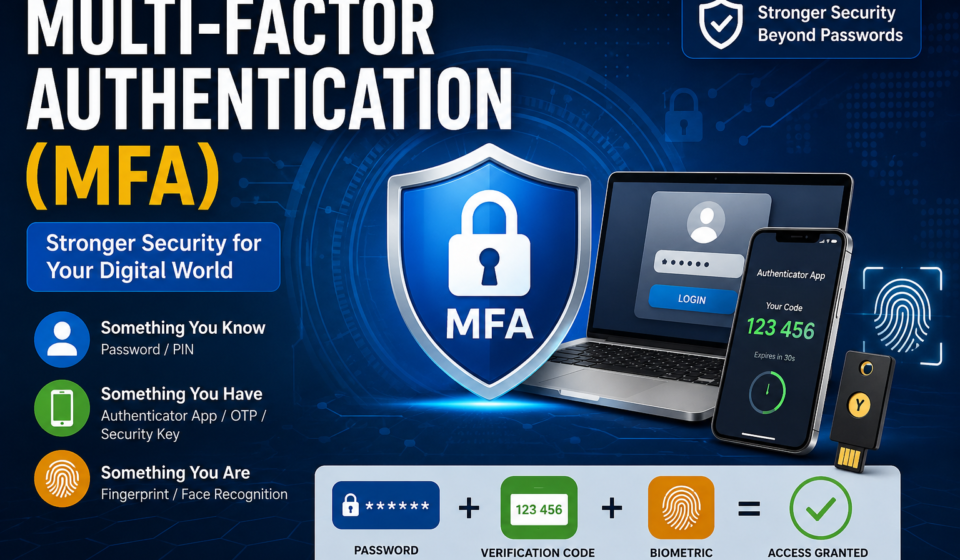
Multi-Factor Authentication (MFA) is a security process that requires users to verify their identity using two or more independent authentication factors before accessing a system, application, or online account.
Instead of relying only on a password, MFA combines multiple forms of identity verification.
For example:
- Password
- Smartphone verification
- Fingerprint
- Face recognition
- Hardware security key
Only after successfully completing all required verification steps does the system grant access.
Why Do Passwords Alone Fail?
Passwords have several weaknesses:
- Weak passwords
- Password reuse
- Phishing attacks
- Credential stuffing
- Keyloggers
- Data breaches
- Social engineering
If an attacker steals your password, they can log in immediately—unless MFA is enabled.
With MFA, stealing the password alone is not enough.
How Multi-Factor Authentication Works
A typical login process looks like this:
User enters username
        │
        ▼
Enter Password
        │
        ▼
Password Verified?
        │
   Yes ─────► Request Second Factor
                    │
                    ▼
      OTP / Authenticator App /
      Push Notification /
      Fingerprint /
      Security Key
                    │
                    ▼
          Authentication Successful
                    │
                    ▼
              Access Granted
Even if hackers know the password, they still need the second verification factor.
The Three Authentication Factors
1. Something You Know
Information only the user should know.
Examples:
- Password
- PIN
- Security Question
- Passphrase
2. Something You Have
A physical device the user possesses.
Examples:
- Smartphone
- OTP Token
- Smart Card
- Hardware Security Key
- Authenticator App
Examples include:
- Google Authenticator
- Microsoft Authenticator
- Authy
3. Something You Are
Biometric authentication.
Examples:
- Fingerprint
- Face Recognition
- Retina Scan
- Iris Scan
- Voice Recognition
Types of Multi-Factor Authentication
SMS OTP
A one-time password is sent via SMS.
Advantages
- Easy to use
- Widely supported
Disadvantages
- SIM swapping attacks
- SMS interception
- Network dependency
Email Verification
A verification code is sent to your registered email.
Pros
- Simple
- Free
Cons
- Email account compromise
- Slower verification
Authenticator Apps
Generate time-based one-time passwords (TOTP).
Popular apps:
- Google Authenticator
- Microsoft Authenticator
- Authy
Advantages
- Offline support
- More secure than SMS
- Resistant to SIM swapping
Push Notification Authentication
Instead of entering a code, users approve a login request.
Examples:
- Microsoft Authenticator
- Duo Mobile
- Okta Verify
Hardware Security Keys
Physical USB, NFC, or Bluetooth devices provide one of the strongest forms of authentication.
Examples include keys compatible with the FIDO2/WebAuthn standard.
Advantages:
- Extremely resistant to phishing
- No OTP required
- Fast login experience
Biometric Authentication
Examples:
- Apple Face ID
- Windows Hello
- Android Fingerprint Unlock
Advantages
- Fast
- Convenient
- Difficult to duplicate
MFA vs Two-Factor Authentication (2FA)
| Feature | 2FA | MFA |
|---|---|---|
| Uses Password | Yes | Yes |
| Second Verification | Yes | Yes |
| More than Two Factors | No | Yes |
| Security Level | High | Very High |
| Enterprise Ready | Limited | Yes |
Every 2FA system is a type of MFA, but not every MFA implementation is limited to only two factors.
Real-Life MFA Examples
Banking
- Password
- SMS OTP
Microsoft 365
- Password
- Microsoft Authenticator
AWS Console
- Password
- Authenticator App
Google Account
- Password
- Security Key
- Fingerprint
Office VPN
- Password
- Smart Card
- PIN
Benefits of Multi-Factor Authentication
1. Stronger Account Security
Even if passwords are stolen, attackers still need the second factor.
2. Protection Against Phishing
Hardware keys and phishing-resistant MFA methods make credential theft much less effective.
3. Prevents Credential Stuffing
Reused passwords alone cannot grant access.
4. Meets Compliance Requirements
Many regulations recommend or require MFA, including standards from financial, healthcare, and government sectors.
5. Reduces Identity Theft
Additional verification significantly lowers the risk of unauthorized account access.
Common MFA Methods Compared
| Method | Security | Convenience |
|---|---|---|
| SMS OTP | Medium | High |
| Email OTP | Medium | Medium |
| Authenticator App | High | High |
| Push Notification | High | Very High |
| Hardware Security Key | Very High | High |
| Biometrics | High | Very High |
Common MFA Attacks
Even MFA can be targeted if implemented poorly.
MFA Fatigue
Attackers repeatedly send approval requests hoping users will accidentally approve one.
SIM Swapping
Criminals transfer your phone number to another SIM card to receive SMS codes.
Phishing Proxies
Fake login pages relay credentials and OTPs to legitimate websites in real time.
Push Bombing
Users receive repeated push notifications until they accept one out of frustration.
Best Practices for MFA
- Use an authenticator app instead of SMS whenever possible.
- Prefer hardware security keys for high-value accounts.
- Enable MFA on email, banking, cloud storage, and social media accounts.
- Store backup recovery codes securely.
- Keep authentication apps and devices updated.
- Avoid approving unexpected login requests.
- Never share OTP codes with anyone.
- Review account login activity regularly.
MFA for Businesses
Organizations should enforce MFA for:
- Employee accounts
- VPN access
- Cloud services
- Remote desktops
- Administrative accounts
- Email platforms
- Financial systems
- HR applications
Benefits include reduced breach risk, stronger compliance, and improved protection for remote work environments.
Future of MFA
Authentication is evolving toward passwordless methods that combine device-based cryptography, biometrics, and standards such as FIDO2 and WebAuthn. These approaches improve both security and user experience while reducing reliance on traditional passwords.
Frequently Asked Questions (FAQs)
Is MFA better than a password alone?
Yes. MFA adds additional verification layers, making unauthorized access much more difficult.
Is SMS MFA secure?
It is better than using only a password but is generally less secure than authenticator apps or hardware security keys.
Can MFA be hacked?
Some attacks can bypass weaker MFA implementations, but phishing-resistant methods such as hardware security keys provide significantly stronger protection.
Does MFA slow down login?
It adds a small verification step, but modern methods like biometrics and push notifications make the process quick and convenient.
Should individuals use MFA?
Yes. Everyone should enable MFA on important accounts, especially email, banking, cloud storage, and social media.
Conclusion
Multi-Factor Authentication (MFA) is one of the most effective and accessible ways to improve account security. By requiring two or more independent verification factors, MFA greatly reduces the likelihood of unauthorized access—even if a password is compromised. For individuals, it helps protect personal information and financial accounts. For organizations, it strengthens cybersecurity, supports compliance efforts, and reduces the risk of costly breaches.
As cyber threats continue to evolve, enabling MFA should be considered a fundamental security practice rather than an optional feature.
External Resources (Authoritative)